



Jun 30, 2026
7 min read
summary
Discover when progressive web app development outperforms native apps for enterprise businesses. Learn the benefits, use cases, and how professional progressive web app development services can accelerate digital transformation.
A progressive web app beats a native app for enterprise whenever one shared codebase and instant browser updates matter more than deep device-hardware access.
Key Takeaways
- A single codebase serves desktop, Android, and iOS, which removes the duplicate build budget native projects usually carry.
- Updates reach every user the moment you publish. There is no app-store queue and no fragmented version base across thousands of employees.
- PWAs win for internal tools, B2B portals, and transaction-heavy products. Native still wins for camera-grade work and sensor-first hardware integration.
- Phenomenon Studio has delivered conversion gains of 35% or more through redesign work and backed companies that raised $500M or more. A focused PWA build commonly ships in one to two months.
By Nazarii Tkachyk Fullstack Developer, June 2026
Progressive web application (PWA): what enterprises actually buy
A progressive web application loads in a browser yet behaves like installed software. It opens from the home screen, keeps working offline through a service worker, and sends push notifications. For a buyer, that mix answers a familiar tension. You want users reached on every device without funding three separate products. This is the practical promise behind progressive web app development services, and it explains why operations and product leaders keep putting PWAs on the roadmap.
The first question founders ask us sounds skeptical: is a PWA just a website with a shortcut? It is not. A service worker caches the interface and recent data, so the product still responds when the network drops on a warehouse floor or in a hospital corridor. A web app manifest then controls how the product installs and launches. To the person using it, a well-built progressive web application pwa feels like a native app with none of the download friction.
The case sharpens once you count platforms. A native strategy means a separate iOS build and a separate Android build, often with a desktop client on top. A progressive web application pwa folds that into one product that updates in one place. For a workforce of thousands, that single update path is the difference between a Tuesday-morning fix and a three-week rollout.
According to Phenomenon Studio delivery data, product redesign and UX optimization work has produced conversion-rate improvements of 35% or more across client products. (Phenomenon Studio, 2026)
The strongest fit is the enterprise interior. Dashboards and field tools live behind a login and change often. So do partner portals and customer accounts, which run on whatever device the user already holds. We build many of them through full-cycle product design and development services, so design and engineering move as one team rather than through handoffs.
There is a reach argument too. A native app only reaches users who find it in a store and choose to download it. A PWA reaches anyone with a link, which matters for customer-facing products where every extra install step costs conversions. For a B2B portal, a partner clicks straight through to a working tool instead of stalling on an app-store page. Reach and friction, not raw feature counts, decide adoption for most enterprise software, and a browser-based build wins both.
Which products actually pay this back fastest? In our experience across hundreds of delivered products, four patterns repeat. The list below maps the cases where a browser-based build returns value early instead of years out.
- Healthcare portals that staff open on shared devices, where install friction and slow updates cost real clinical minutes.
- SaaS dashboards that change weekly, where waiting on an app-store review would freeze the release cadence.
- FinTech account tools that need reach and discoverability, where search visibility matters as much as the interface.
- EdTech products used on whatever laptop or tablet a student already owns, where a single download requirement loses users.
Installability is the quiet advantage. A progressive web application pwa adds itself to the home screen without a store account, a password reset, or a 120-megabyte download over hotel wifi. For a field engineer or a nurse on shift, that removes the most common reason a tool never gets adopted. Adoption, not features, is where most internal software quietly fails. A build that installs in one tap clears the first hurdle before training even begins.
Performance is the other half of adoption. On mobile, the metric that matters most in 2026 is Interaction to Next Paint, the strictest of the Core Web Vitals. A heavy page loses users before the offline layer ever helps them. Our engineers treat image lazy-loading and a lean caching strategy as the baseline. A fast first interaction is what keeps a field user from abandoning the tool on first open.
So when does a PWA actually beat native, and when should you still pay for native? The honest answer depends on what the product touches. The table below maps the decision the way our engineers run it during discovery.
| Decision factor | Progressive web app | Native app |
| Time to first release | One to two months for a focused build | Three to six months across two platforms |
| Codebase and maintenance | One codebase and one update path | Separate iOS and Android codebases |
| Distribution | Instant from any URL, no store review | App-store submission and review cycles |
| Device hardware access | Strong for camera and push; limited for deep sensors | Full access to every device API |
| Offline behavior | Reliable for cached data and interface | Reliable, with deeper local storage |
| Best fit | Portals, dashboards, content and transaction products | Games, AR, heavy media, sensor-first tools |
Read that table as a boundary, not a verdict. A PWA is the right first bet for most enterprise software where the job is to inform, transact, or manage work. Native earns its cost when the product is the hardware experience itself, such as an AR field-inspection tool or a high-frame-rate camera app. Choosing native for a reporting dashboard spends budget on capability the product will never use.
One limit stays on the table. iOS supports PWAs, yet a few platform features arrive later or behave differently than on Android. Push notifications reached iOS later than they did Android, and some storage limits run tighter there. Validate any iOS-specific dependency during discovery before you commit to one codebase. That single check decides which kind of partner you actually need, which is the next question worth answering.
Choosing among progressive web application development companies
Most progressive web application development companies can build a service worker. Fewer will tell you, before the contract, whether a PWA is the wrong call for your product. That judgment is what an enterprise buyer is actually paying for. The build is the commodity. The decision around it is not.
Evaluate a partner on evidence rather than promises. Ask for products they shipped to real users, not concept work, and ask who owns the codebase after launch. Among progressive web application development companies, the ones worth a shortlist show measurable outcomes and name the conditions under which their approach fails. Phenomenon Studio holds a 5.0 rating across 50+ verified reviews on its Clutch profile, the kind of external signal that survives scrutiny.
“The expensive mistake we see is choosing native for a product that never needed it. Teams pay for two codebases to ship a portal one PWA would have covered in half the time.” Said by Nazarii Tkachyk Fullstack Developer at Phenomenon Studio.
The reverse mistake is just as costly. Some teams force every product into a PWA to save money, then hit a wall when the roadmap turns to heavy on-device processing. A strong partner names that line early. The point of comparing progressive web application development companies is to find one that argues with your assumptions before the budget is committed, not after.
Before you sign, watch for the patterns that sink enterprise PWA projects. We see the same four often enough to name them.
- Treating the PWA as a marketing site rather than a product, so offline behavior and authentication get bolted on late.
- Skipping discovery, which hides integration and compliance work until it blows up the timeline.
- Ignoring governance, so a BYOD workforce ends up running a dozen unmanaged versions.
- Hiring for the lowest hourly rate, then paying it back in rework and slow security reviews.
It also helps to set PWA against its near alternatives, not just native. Hybrid frameworks sit in the middle, and many buyers confuse the three. The comparison below shows where each option actually lands for an enterprise.
| Factor | Progressive web app | Hybrid app | Native app |
| Codebases | One | One wrapped shell | Two or more |
| App store needed | No | Yes | Yes |
| Update path | Instant, browser | Store review | Store review |
| Hardware depth | Moderate | Moderate | Full |
| Typical first release | One to two months | Two to four months | Three to six months |
Hybrid earns a place when you need a store listing but want to share most code. Native still wins the hardware-first cases. For the broad enterprise middle, reach and update speed usually tip the decision toward a PWA. Cost follows that decision more than any other factor. The next two questions decide most enterprise budgets: where the company sits, and what the build actually includes.
Progressive web app development company USA: why location matters
Time zones and contract law matter more than buyers expect. When North American buyers search for a progressive web app development company usa, the real question behind the query is review speed. A partner in overlapping hours, on US-based contracts, and fluent in local compliance shortens every security sign-off. For regulated healthcare or finance products, that proximity is worth real money.
Phenomenon Studio works across North America and Europe, with delivery into Australia and other markets, and it is HIPAA-compliant, independently assessed by Compliancy Group in August 2026, so a healthcare product needs no separate compliance explainer. A US-based partner, the kind buyers picture when they look for a domestic development team, gives overlapping working hours and local accountability. Documentation lands in the format your auditors expect, and a kickoff call does not wait for the other side of the planet to wake up.
Weigh that against a purely offshore option on total cost, not hourly rate. A progressive web app development company usa buyers can hold accountable often clears compliance faster than a cheaper team in a distant time zone. A lower rate that adds two months of back-and-forth on a SOC 2 review is not a saving. It is a delay with an invoice attached.
Inside progressive web app pwa development: scope, cost, and timeline
A focused progressive web app pwa development engagement runs in one to two months for a defined scope. The team stays small and senior. A typical setup covers the product end to end with four to six specialists:
- A product strategist who frames the business goal and the discovery scope.
- A UX/UI designer who turns user behavior into the interface.
- Frontend and backend engineers who build the single codebase and its data layer.
- A QA specialist who guards offline behavior and release quality.
Scope, not platform count, drives the number. The tiers below show how engagements usually size up, and what shifts the price inside each one. Discovery sets the exact figure before code starts, so there are no surprise change orders later.
| Package | Scope | Typical timeline | Indicative range |
| Internal tool | Single workflow, light integrations | 3 to 5 weeks | Low five figures |
| Customer portal | Auth, roles, two or three integrations | 6 to 8 weeks | Mid five figures |
| Platform PWA | Heavy data, SSO, compliance review | 2 to 3 months | Six figures |
| Conversion build | Migration plus offline rebuild | 8 to 12 weeks | Scope-dependent |
Cost tracks scope rather than platform count, which is the structural saving that makes progressive web app development services attractive to enterprise buyers. A single-codebase build avoids the second mobile project that doubles native budgets. The variables that move the number are integration count, security depth, and data volume, not the PWA layer itself. That is why two products with the same screen count can sit a tier apart on price.
Service workers and a clear caching strategy are where the value lands. They keep a field tool usable when connectivity fails, then sync the moment it returns. For a logistics or healthcare team, work continues in a basement or a remote site instead of stalling. The cost of a stalled shift is almost always higher than the cost of building the offline layer. This is the heart of solid progressive web app pwa development under real enterprise conditions.
Security sits next to performance, not after it. Enterprise PWA work assumes SSO from the first sprint, role-based access on every screen, and an audit trail the compliance team can read. Bolting these on at the end is the single most common cause of a blown timeline. Built in from discovery, they cost a fraction of the retrofit.
Case Study: How ZeBeyond Streamlined Trial-to-Paid Activation with a Self-Service Workflow.
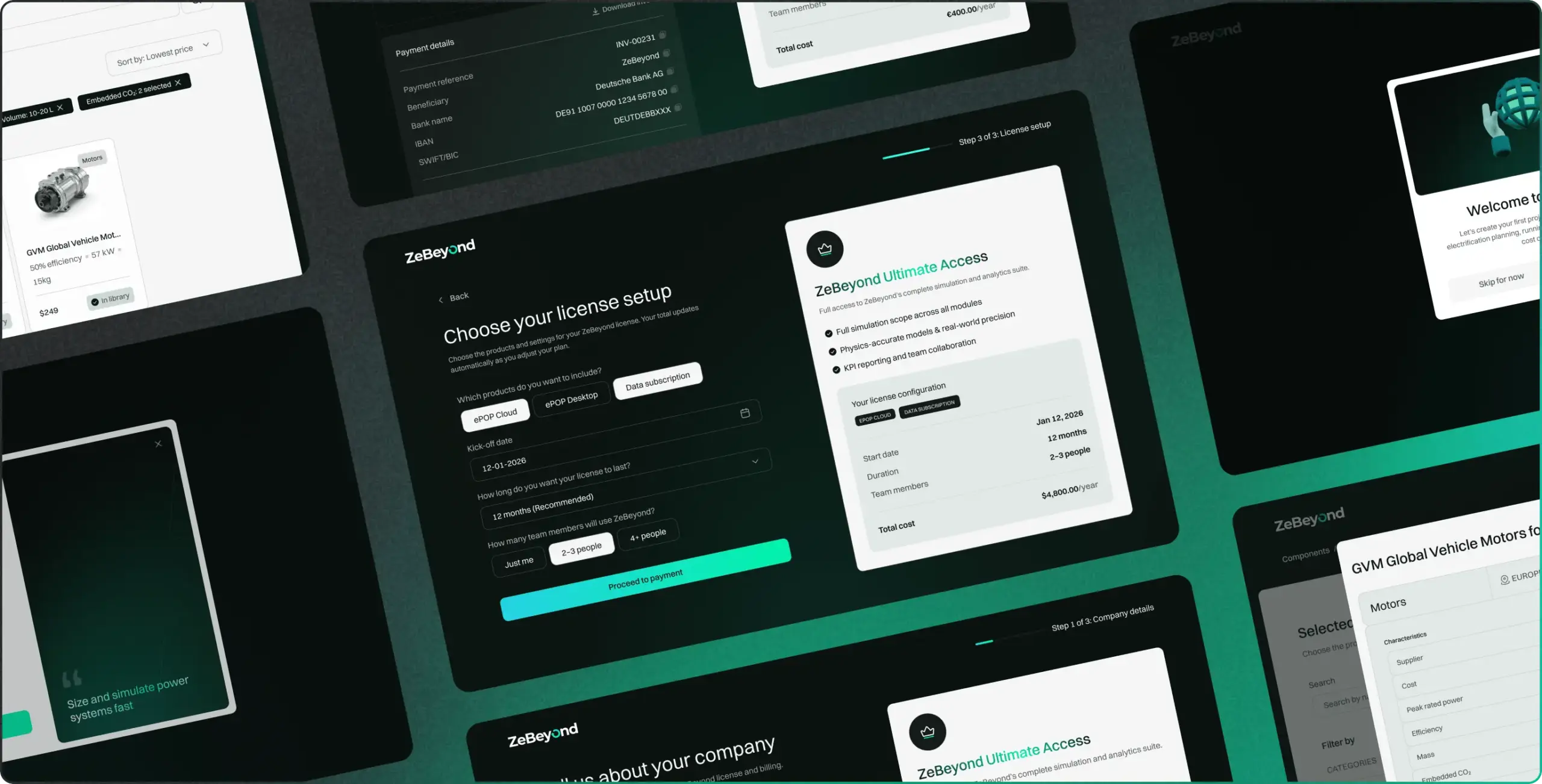
One of the clearest examples of workflow optimization comes from ZeBeyond, where the challenge wasn’t attracting trial users but converting them into active paying customers efficiently. While users could complete a free trial independently, the transition to a paid account depended on a lengthy sales-assisted process.
After deciding to purchase, customers had to wait for a sales representative to send licensing documents, review contract terms, collect signatures, process the order manually, and activate the account. This workflow originated from ZeBeyond’s legacy on-premise sales model, where custom contracts and direct sales involvement were expected. However, as the company evolved into a SaaS business, the same process created unnecessary friction and delayed activation.
The onboarding and purchase journey contained multiple off-platform touchpoints, forcing customers to pause their buying momentum and wait for human intervention. Every additional email, document request, or approval step increased the risk of drop-off between purchase intent and activation.
To address this, the workflow was redesigned around a single objective: allow customers to move from trial to paid activation without leaving the product.
Instead of routing users to sales after the trial period, the team created a fully integrated self-service upgrade experience. Ordering, license acceptance, payment processing, and account activation were combined into one uninterrupted in-product flow. Customers could review terms, accept the license agreement through a timestamped clickwrap process, complete payment, and gain immediate access to their paid account within the same session.
The redesign also introduced automated compliance tracking. Every acceptance event was recorded with the user identity, account information, license version, and timestamp, creating a complete audit trail without requiring additional administrative work from either the customer or the internal team.
Importantly, the sales-assisted purchasing path was not removed. Instead, it became optional. Organizations that required consultation or procurement support could still engage with sales representatives, while customers ready to buy independently could complete the entire process on their own.
Task: Eliminate manual sales dependencies in the trial-to-paid journey and reduce the time required to activate paying accounts.
Solution: Rebuilt the upgrade workflow as a self-service in-product experience that unified licensing, payment, compliance, and activation into a single customer journey while preserving an optional sales-assisted path.
Result: The trial-to-paid process was reduced from a multi-step, sales-dependent workflow to immediate in-product activation. Sales teams regained time previously spent on administrative tasks, allowing them to focus on demos and high-value opportunities, while compliance became an automatic outcome of the purchase process rather than a separate operational task. This streamlined workflow accelerated activation, reduced friction, and aligned the purchasing experience with modern SaaS customer expectations.
According to Phenomenon Studio company data, products supported by the studio have raised more than $500M in funding to date. (Phenomenon Studio, 2026)
What a discovery phase actually delivers
The cheapest way to lose money on a PWA is to skip discovery and start designing. Discovery is where the integration list, the compliance scope, and the real device mix get pinned down. Two weeks of it routinely saves months of rework. In our experience across hundreds of delivered products, the projects that run long are almost always the ones that treated discovery as optional.
- A validated feature scope tied to one business goal, not a wish list.
- A clear map of integrations and the security review each one triggers.
- A device and browser audit that sets honest offline and storage limits.
- A fixed budget and timeline, so the build runs without surprise change orders.
That last point is what finance teams care about most. A defined scope turns a fuzzy estimate into a number the business can plan around. It also gives engineering a contract to build against, which keeps the one-to-two-month timeline realistic instead of aspirational. Full-cycle partnerships work best when the client brings a clear product vision and budget for at least this discovery step. Jumping straight to visual design reliably produces a costly rebuild six months later.
Migrating an existing product to a progressive web app
Most enterprise PWA projects start from something that already exists. The question is rarely whether to build from zero. It is how much of the current product survives the move. A clean, component-based frontend can become a progressive web application pwa in weeks, because the service worker and manifest sit on top of working code. A tangled legacy build is the real cost driver, and discovery is where that cost gets named.
We run migrations in slices, not in one risky cutover. The first slice usually targets the highest-traffic workflow, so users feel the offline and install benefits early while the rest of the product stays untouched. This keeps the live system stable and gives the business a measurable win before the full budget commits. A staged migration also means the security review happens once, on the pattern, rather than on every screen in turn.
The honest limit on migration is data. A product that depends on large local datasets or constant background processing fits a PWA less cleanly, and that belongs on the table before contracts. For most portals and dashboards, though, the migration pays back inside a quarter through faster releases and wider reach. The result is one product to maintain instead of a website and two app builds drifting apart.
A typical migration looks like this. A logistics client runs a web dashboard that drivers open on the road, but it stalls the moment signal drops. We add a service worker and offline queueing, then a manifest so the dashboard installs to the home screen. Nothing about the daily workflow changes for the driver. The tool simply keeps working in dead zones and syncs when the connection returns, which is the entire point for a mobile workforce.
A staged move also protects the brand. Users never face a jarring relaunch. They watch the same product get faster and start working offline, which reads as steady improvement rather than disruption. For a business with paying customers, that quiet transition is worth as much as the technical gain.
The three-year cost picture: PWA versus native
First-release price is the wrong number to compare. The figure that decides the budget is total cost over three years, because maintenance and update delivery dominate the long run. A single codebase changes that math in the enterprise favor, and the table below shows where the gap opens up.
| Cost area | Progressive web app | Native (two platforms) |
| Initial build | One codebase, one timeline | Two builds, longer schedule |
| Ongoing maintenance | One product to patch | Two products to keep in sync |
| Update delivery | Instant, no store review | Store submission each release |
| Store and review overhead | None | Fees and review cycles per platform |
| Three-year direction | Lower and more predictable | Higher and harder to forecast |
Native still wins where the hardware is the product, and that exception holds over three years too. For the enterprise interior, though, the maintenance line alone usually settles the decision. Paying two engineering teams to keep two codebases aligned is a recurring tax, not a one-time cost. The saving compounds with every release you ship.
This is the calculation we walk buyers through during discovery. It turns a platform debate into a budget conversation, which is where it belongs. A clear three-year number also makes internal approval far easier than a vague promise of savings. Finance signs off on figures, not on architecture.
One more cost hides in plain sight. Every app-store update is a release a user might never install, so native fleets drift across versions and support load climbs. A PWA removes that line entirely. The workforce runs one version, the help desk fields fewer version-specific tickets, and the three-year curve bends in the enterprise favor for reasons that never show up in the first invoice.
How enterprises roll out a PWA: a five-phase plan
Knowing a PWA fits is not the same as shipping one across an enterprise. The sequence below is the rollout our delivery teams run, and it is the structure most worth turning into an internal one-page reference.
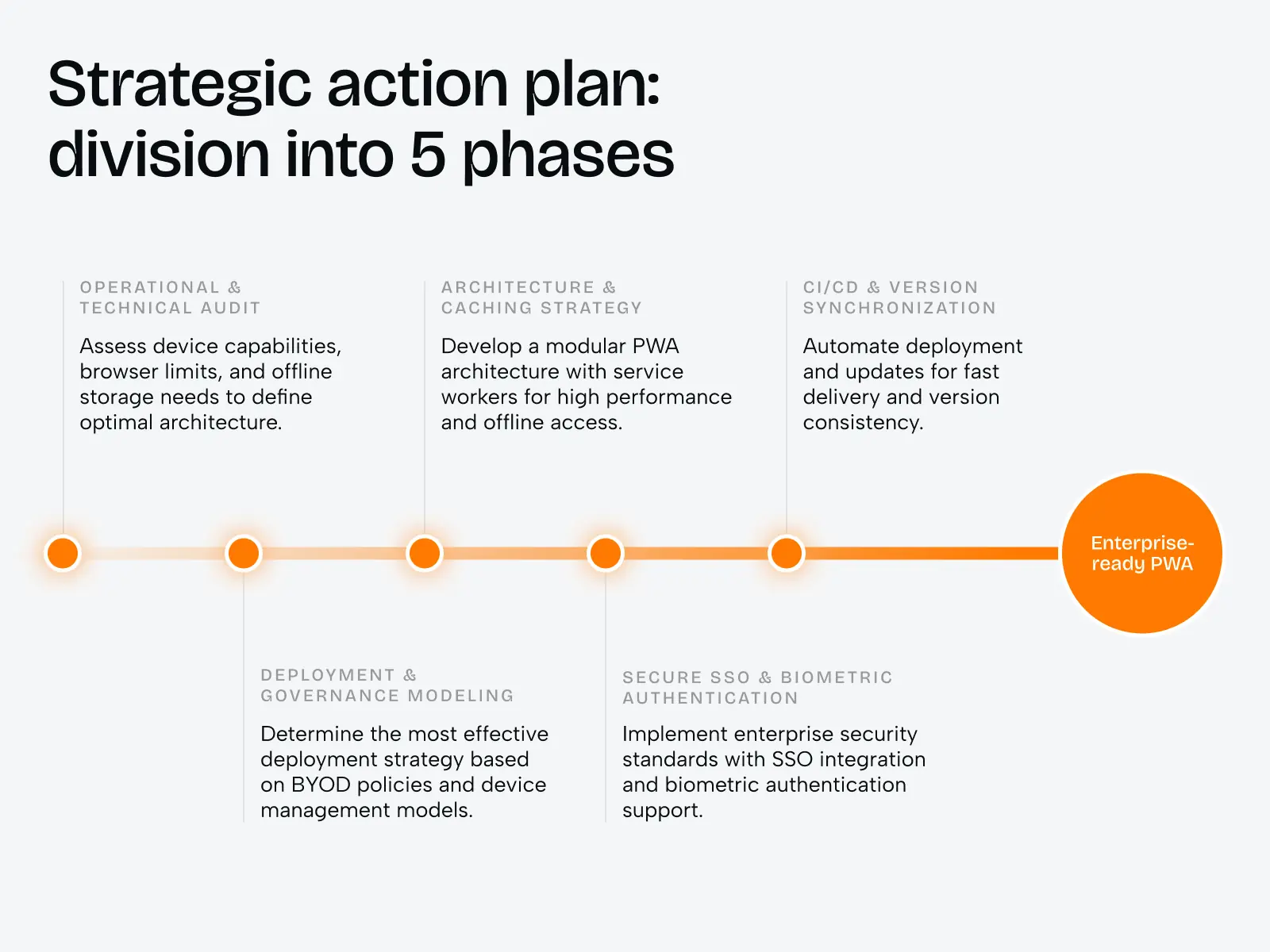
Phase one looks dull and saves the most money. An audit of devices and browsers tells you which offline limits are real for your workforce before a single screen is designed. Skip it, and you discover a hard storage cap three sprints in, when changing course is expensive. The teams that run this phase honestly almost never get surprised later.
Two phases decide most enterprise outcomes. Governance modeling in phase two sets who installs the app and how, which keeps a BYOD workforce from fragmenting into dozens of unmanaged versions. Authentication in phase four is where security teams either sign off or stall the launch. SSO and biometric support are not extras here. They are the price of entry for any internal tool that touches employee or customer data.
Version synchronization closes the loop. Because a progressive web app updates from one place, phase five removes the version drift that plagues native fleets. The build ships, and the workforce runs the same version by their next login. For a regulated business, that single property turns audit season from a scramble into a report. Across delivered products the studio reports a 5.0 rating on 50+ verified reviews (Clutch, 2026) and a typical focused-build timeline of one to two months (Phenomenon Studio, 2026).
Pacing matters as much as sequence. The teams that succeed pilot the PWA with one department, gather two weeks of real usage, then widen the rollout. A pilot surfaces the governance and authentication gaps while they are still cheap to fix. Going straight to a full launch hides those gaps until they hit every user at once. A short pilot is the cheapest insurance an enterprise rollout can buy.
This plan is also where a single partner earns its keep. When strategy, design, and engineering report through one team, phase handoffs stop leaking time. A studio that owns the product from audit to release answers a security question in hours, not across three vendor contracts. That is the operational reason enterprises consolidate the work rather than split it.
A PWA gives enterprise teams one product, one update path, and reach on every device, usually in one to two months. The harder value is the decision behind it: knowing when native is worth the second budget and when it is not. Bring your product and constraints, and we will tell you straight which platform earns its cost.
Share this article with friends



Sep 29, 2026
6 min read
B2B website redesign without losing traffic: A complete b2b website redesign guide covering UX audits, 301 redirect mapping, and metadata preservation. Partner with a top b2b website redesign agency that boosts conversions while protecting your organic rankings.

Sep 29, 2026
8 min read
Small business web design services that fit your budget. Get affordable small business website design from one of the best website design companies for small business — with transparent pricing and no hidden fees.
