



Nov 21, 2026
7 min read
summary
Discover legacy systems migration costs, timelines, and 7 key stages. Explore pricing from $25K to $500K+, cost factors, and real migration results.
Direct answer: Legacy systems migration usually takes 2 to 10 months and costs roughly $25,000 to $500,000+, with the final figure set mostly by how deep and messy the old data is.
Key Takeaways
- A small business migration runs 2–4 months, architecture and data transfer included. Enterprises holding decades of records need 5–10 months.
- At a market-average rate near $40 per hour, small systems migrate for 25k–75k and mid-sized ones for 55k–190k. Enterprise platforms start around $160k and can pass $500k.
- Data quality moves the estimate more than code size does. A two-year-old product can hold messier data than a 20-year-old one.
- On a 16-year-old monolith, our rebuild kept 500+ endpoints returning identical responses 5–7x faster than before.
Most teams ask about price first and stages second. This article answers both in that order, then shows where the money actually goes. For the full scope of work behind these numbers, see our legacy systems migration services.
How much does legacy systems migration cost?
A small system migrates for roughly 25k–75k, a mid-sized one for 55k–190k, and an enterprise platform for 160k–500k or more. These ranges reflect market rates for a product design and development agency with an Eastern European delivery team. Onshore US teams at 100–150 per hour push the same scope two to three times higher.
We calculated each range the way a real estimate works: team size multiplied by months of work and a blended hourly rate of about $40, the middle of the market for nearshore teams. Clutch groups agency rates into brackets, and most Eastern European engineering teams sit in the 25–49 range.
| Business size | Typical system | Timeline | Team | Approximate budget (USD) |
| Small business | One product, a few years of data, a handful of integrations | 2–4 months | 2–3 specialists | 25k–75k |
| Mid-sized business | Several modules, paying customers, CRM or billing links | 3–6 months | 3–5 specialists | 55k–190k |
| Enterprise | Data collected over decades, many tenants, strict compliance | 5–10 months | 5–8 specialists | 160k–500k+ |
Every timeline above includes architecture, development, and the full data transfer. Here is what each budget buys in practice.
Small business: 25k–75k
This budget covers one product with a few years of data and a short list of integrations. Two to three specialists work for 2–4 months. A tech lead who writes backend code pairs with a frontend engineer, while QA and a project manager join part-time.
The lower end fits a rehost or replatform of a stable app. The upper end fits a partial rebuild with a data cleanup pass.
Mid-sized business: 55k–190k
Here the system has several modules, paying customers, and links to CRM or billing tools. Three to five specialists work for 3–6 months, with a dedicated backend engineer and DevOps support added to the core team.
Most of the spread inside this range comes from integrations. Each external connection needs its own field mapping and test runs. A product that must keep releasing during the move also lands closer to the top.
Enterprise: 160k–500k+
Enterprise budgets cover data collected over decades, many tenants, and strict compliance rules. Five to eight specialists work for 5–10 months, adding a second backend stream and a security review track.
Multi-tenant platforms often migrate one tenant at a time. On an edtech project, we moved each university separately with dry runs and a go/no-go call before every run. Budgets above $500k usually mean a zero-downtime requirement or a full UX/UI redesign on top of the move.
According to the U.S. Government Accountability Office, federal agencies spend about 80% of their IT budgets on operating and maintaining existing systems. (GAO, 2019)
That figure explains why migration budgets get approved at all. Keeping an old system alive is rarely the cheap option. The real question is which part of the estimate your system will stretch.
What drives the cost of migrating a legacy system?
Six factors decide where your project lands inside those ranges. Any one of them can move a small project from $25k toward $75k, or push a mid-sized system into the enterprise tier. Technical discovery pins each one down before you commit to the full budget.
| Factor | Lower cost when | Higher cost when |
| Data depth and quality | Records are clean and well structured | Duplicates, gaps, and business rules hide in the data |
| Migration approach | The app only needs rehosting | The system needs a rebuild or full replacement |
| Integrations | Few external connections exist | Each CRM, ERP, or payment link needs its own mapping |
| Compliance | No regulated data is involved | HIPAA, SOC 2, or GDPR adds encryption and audit trails |
| Downtime tolerance | A planned 1–2 hour window is acceptable | Zero downtime requires both systems running in parallel |
| UX/UI redesign | Screens stay as they are | A new interface turns the move into a new product version |
Where compliance changes the math
Regulated data adds work at every stage. One of our healthcare clients needed HIPAA compliance, so we moved its platform to a new AWS backend and encrypted all PHI on import. Field-level encryption and role-based access then became standard parts of the build. For healthcare and fintech teams, this is the line item that grows most often.
Knowing the cost drivers tells you what you pay for. The stages show when you pay for it.
What are the key stages of legacy migration?
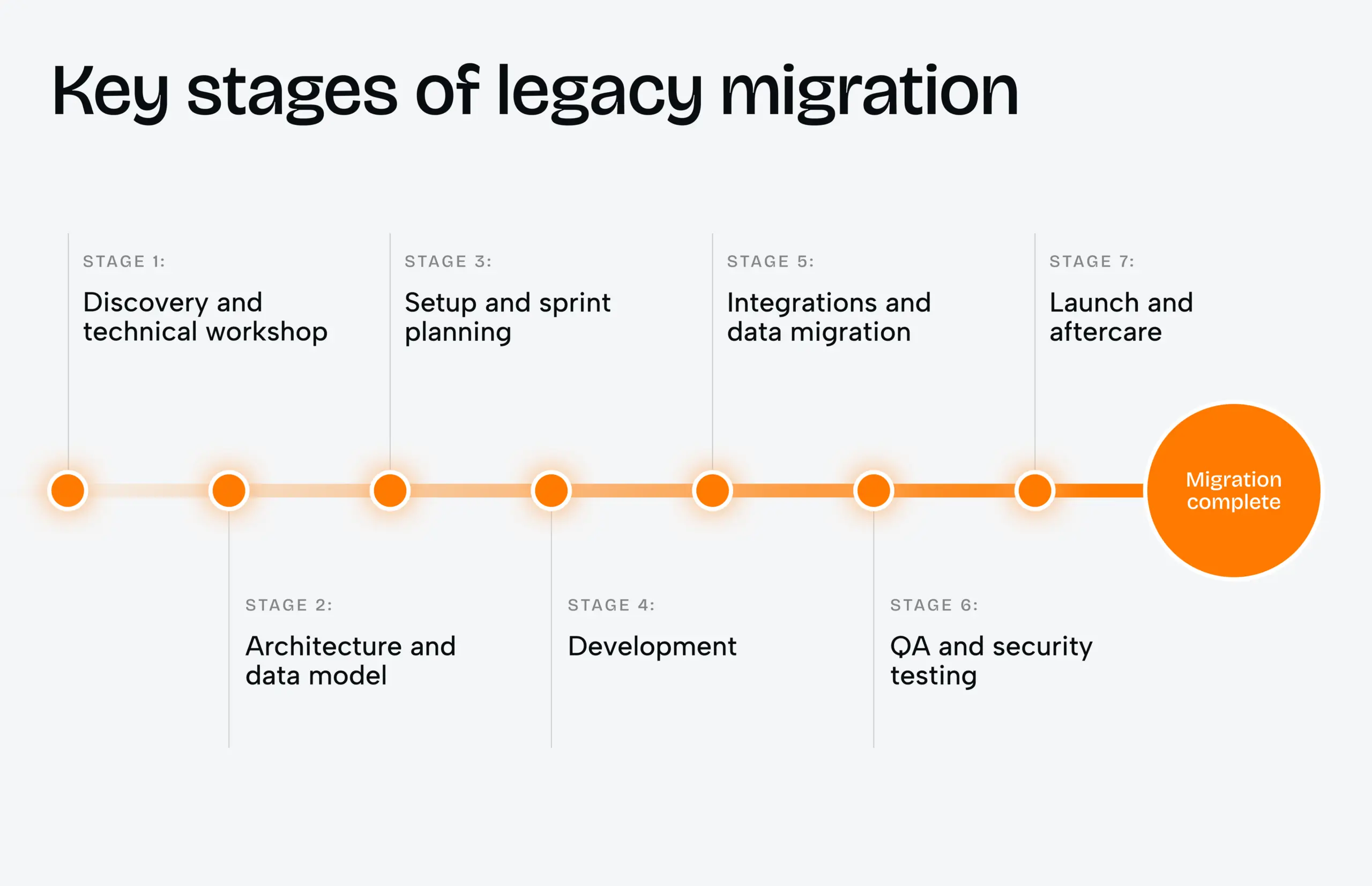
A well-run migration moves through seven stages, and each one ends with deliverables you review before work continues. The order exists to keep risk low, not to fill a Gantt chart.
- Discovery and technical workshop. Our engineers review architecture and data with AI-assisted checks, while a tech lead reads the code. The review takes about 40 hours instead of 80–140 hours done by hand.
- Architecture and data model. We design the target schema from scratch and pick an approach per module. A stable billing module may only need rehosting, while the core needs a rebuild.
- Setup and sprint planning. Every environment gets defined as code and loaded with fully anonymized data. Your product owner plans two-week sprints with us.
- Development. New services go live behind feature flags or a compatible API. The old system keeps serving customers the whole time.
- Integrations and data migration. Scripted batch jobs move records and billing data. Each job is rehearsed on full-size copies and ends with a go/no-go call.
- QA and security testing. Parity tests compare API responses and database records on both systems. Load tests then measure speed against the baseline from stage one.
- Launch and aftercare. The switch happens in a planned 1–2 hour window at the lowest-traffic hour. A rollback plan stays ready until post-migration checks pass.
For most budgets, stages one and five matter most. Discovery decides the approach, and data migration decides whether the timeline holds.
The stages also leave room for honest limits. Fully zero downtime is possible, but it needs continuous data sync between both systems, and that raises the cost. For most products we recommend the planned window instead.
Start with a technical workshop.
Case study: splitting a 16-year-old monolith
The developer who built the billing logic had left years earlier, and nobody else knew what it touched. Every small change broke something in a distant module. The client could not freeze the roadmap, and one failed weekend cutover risked its biggest accounts.
Task
Move a 16-year-old monolithic SaaS platform to a modern architecture without stopping releases. More than 500 API endpoints had to keep answering exactly as before, because client integrations depended on them.
Solution
- With no documentation available, our engineers read the code and mapped every dependency first.
- We split the monolith into services, each with its own database and clear module boundaries.
- Automated parity checks compared API responses on both systems after every test migration.
- The final switch ran in a planned window, with a rollback plan ready throughout.
Result
- 500+ endpoints return identical responses on the new system.
- Those responses arrive 5–7x faster than on the legacy platform.
- A change to billing now stays inside billing, backed by automated tests and written docs.
The same incremental method works on frontends too. On an agtech platform, we cut the number of files using the old UI library from 370 to 122 while feature work continued. You can browse more delivered products in our project portfolio.
Results like these depend on choosing the right partner as much as the right plan.
Common migration mistakes that inflate the budget
Most overruns we see trace back to decisions made in the first two weeks. Four mistakes come up again and again.
- Estimating from code size alone. The data hides the real work, so a quote without data analysis is a guess.
- Planning one big weekend cutover. Without rehearsed dry runs, a single failed run can cost hours of work and customer trust.
- Skipping integration mapping. Old systems often connect to partners through exports and scripts nobody wrote down.
- Leaving decisions without an owner. Questions about which records to archive stall development when no one on the client side can answer them.
According to the U.S. Government Accountability Office, the ten federal legacy systems most in need of modernization ranged from about 8 to 51 years old. (GAO, 2019)
Age alone did not make those systems expensive. Undocumented dependencies did, and the same pattern shows up in private companies a fraction of that age.
Why hire a product design agency for a migration?
A migration that only moves code leaves the product exactly as hard to use as before. A product design and development agency can rebuild screens on a component kit while the backend moves, so users get a better version instead of a copy. The redesign stays optional, and it adds cost, so we recommend it only where screens block growth.
Phenomenon Studio works with 70+ mid-to-senior in-house experts under one roof. Design and engineering share one team, which removes the handoff gap between them. We hold a 5.0 rating across 50+ verified reviews on Clutch, and much of our migration work sits in regulated industries like healthcare and fintech.
Every week an old system stays in production, it costs more to keep and more to leave. Share what your system runs on and how much data it holds, and we will tell you which of the three budget tiers it fits. Our team will send an itemized legacy migration estimate after a technical workshop.
Share this article with friends



Nov 11, 2026
7 min read
Discover when and why FinTech, SaaS, healthcare, EdTech, and logistics companies need strategic branding to build trust, stand out, and support business growth.

Oct 31, 2026
9 min read
Webflow Enterprise or a custom Next.js build? Compare 2026 pricing, 24-month TCO, launch timelines and hard limits before you choose your enterprise stack.
