



Oct 29, 2026
6 min read
summary
Discover five warning signs your design system is holding your team back and learn how to evolve it for faster decisions, consistency, and scalability.
Nobody builds a design system to slow their team down. They build it to do the opposite — to make decisions faster, keep the product consistent, and give designers a foundation to build on instead of a blank page every time.
But products change. They grow into new user types, new use cases, new technical constraints. And design systems, unlike the products they serve, don’t evolve on their own.
The uncomfortable truth: a design system that once enabled the team can quietly become the thing that limits it. The teams that notice earliest are the ones who avoid the most expensive rebuilds later.
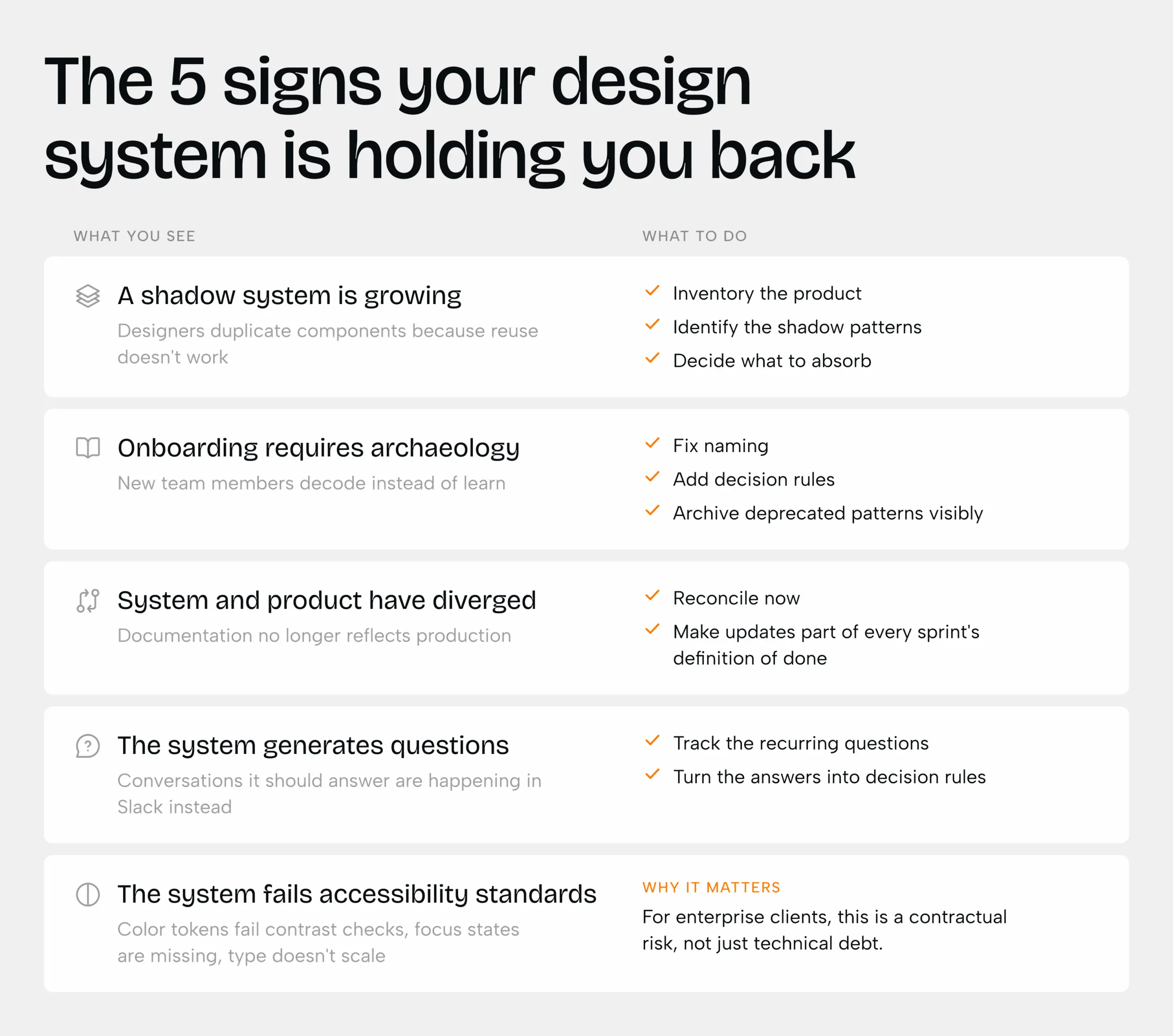
Here are five signs to watch for — and what to do when you spot them.
Sign 01. A shadow system is growing inside your product
This one is harder to spot because it happens quietly, one small decision at a time.
A designer needs a card layout slightly different from the one in the system. Rather than spending an hour adapting a component that wasn’t built for this, they build a new one. It’s faster, it works, and they move on. Someone else does the same thing two weeks later, slightly differently. Then again.
By the time anyone notices, there are three versions of the same component living in the product — none of them documented, none of them maintained, none of them visible to the next designer who opens the system looking for guidance. “Duplication is rarely laziness.
It’s a signal that the system isn’t serving the actual work.”
The shadow system becomes the real one. The official system is what everyone stops trusting — but nobody has the time or mandate to fix.
What to do
Do a component inventory across the product — not the system, the actual shipped product. Tools like Figma’s component usage reports or a manual audit of production screens will surface duplicates quickly. The goal isn’t to delete them. It’s to understand why they exist, and whether the system needs to absorb them.
- Identify components that exist in the product but not in the system
- For each one: is it a valid new pattern, or a workaround that should be fixed at the source?
- Establish a lightweight contribution process so new patterns get documented when they’re created — not six months later

Sign 02. New designers decode the system instead of learning it
A design system should reduce the cost of onboarding. A new designer joins, opens the system, and within a reasonable period understands the product’s structure, the key patterns, and how to build something new without breaking consistency. The system does the teaching.
When the system has grown without deliberate maintenance — components added for specific projects and never generalized, naming conventions that evolved independently, documentation that describes what something looked like two years ago — onboarding becomes something different entirely.
The new designer asks why a component is named the way it is. Nobody knows. They ask what the difference is between two nearly identical variants. The answer is in a Slack thread from 2023. They start building, and their decisions look slightly off — not because they’re not capable, but because the system didn’t give them enough to work with.
“If understanding the system requires talking to three people before opening Figma, the system isn’t doing its job.”
This matters beyond onboarding. The same confusion that slows new hires affects any designer who hasn’t worked in a particular area of the product recently. A system that requires institutional memory to navigate is a system that can only be used by the people who built it.
What to do
Run an onboarding test. Give a new team member (or someone unfamiliar with a section of the product) a small design task, and watch how they navigate the system without help. Every moment they get stuck is a documentation gap or a naming problem worth fixing.
- Audit component names — they should describe what something does, not where it was first used
- Add a one-line “when to use this” note to any component that’s been confused with another
- Archive deprecated patterns visibly — don’t just remove them, mark them as retired with a link to what replaced them
Sign 03. The system and the product have become two different things
Open the design system. Open the live product. Compare them.
In a healthy team, they match. Components reflect what’s in production. Tokens are accurate. Documentation describes what’s actually there. In a struggling team, the gap is visible immediately — a color that doesn’t match, a component updated in production but not in the system, a deprecated pattern still documented as correct.
When this gap exists, the system stops being a source of truth and becomes a liability. Developers stop trusting the specs and implement from screenshots. Designers stop referencing the system because they know it’s stale. New hires learn the wrong patterns and have to unlearn them.
“A system that doesn’t reflect the product isn’t a system. It’s a historical document with a misleading name.”
The gap usually opens gradually — a sprint where the system update gets deferred, a release where documentation wasn’t the priority. But it closes slowly, and only with deliberate effort.
What to do
Treat system updates as part of the definition of done for every feature — not a separate task for later. “Later” rarely comes. If the gap is already wide, start with a reconciliation sprint: go through the system systematically and mark every component as accurate, outdated, or deprecated.
- Add a “last verified” date to each component so teams know what to trust
- Assign system ownership — someone whose job includes keeping it current, not just contributing to it
- When a component changes in production, the system update ships in the same sprint
Sign 04. Your team is having conversations the system should make unnecessary
A design system makes certain conversations unnecessary. Should this button be primary or secondary? The system answers that. What does an empty state look like here? The system shows you. How much spacing between these elements? The system specifies it.
When the system is struggling, those conversations come back. Not because the designers don’t know what they’re doing — but because the system no longer gives a clear enough answer, or the answer doesn’t quite fit the situation, or the answer changed and nobody updated the docs.
The overhead is invisible in any single instance. But across a sprint, across a quarter, it accumulates. Design reviews take longer. Developer handoffs require more annotation. Every routine decision becomes a discussion.
“A system that generates more questions than it answers has inverted its purpose.”
At this point, the question isn’t whether the system needs work. It’s whether incremental improvements are worth pursuing — or whether the cost of a proper redesign is now lower than the cost of continuing to work around what you have.
What to do
Track the conversations, not just the components. For two weeks, note every design review comment, developer question, or Slack thread that exists because the system didn’t give a clear enough answer. Group them by type. The patterns reveal exactly where the system is generating the most friction.
Identify the 3 questions that come up most often in design review — those are your system gaps
Add decision rules, not just specs: “use primary button when there is one primary action per screen”
If the same conversation has happened three times, the system should answer it — not the designer
Worth noting
Signs 1–4 can accumulate quietly for months. Sign 5 — accessibility — tends to stay invisible the longest, because it doesn’t slow the design process directly. It shows up later, in audits, legal reviews, and enterprise sales calls that go sideways.
Sign 05. The system no longer meets accessibility standards
Accessibility standards evolve. WCAG 2.2 introduced new criteria. Browser defaults changed. What passed an audit three years ago may not pass one today.
A design system built without accessibility as a foundational concern — or one that was built well but never updated — can quietly accumulate violations across every component that references it. A color token that no longer meets contrast requirements. An interactive element without proper focus states. A typographic scale that doesn’t legibly scale down on mobile.
For enterprise products, this isn’t just a design quality issue. Accessibility is frequently a legal and contractual requirement. A system that can’t support WCAG 2.2 AA compliance across the product is a liability, not just technical debt.
“A system that fails accessibility isn’t just outdated. It’s a risk.”
What to do
Run an accessibility audit against your current component library. Tools like Stark or Figma’s built-in accessibility annotations can surface contrast failures and missing states quickly. The goal isn’t to fix everything at once — it’s to understand the scope.
Audit color tokens first: check every text/background combination against WCAG 2.2 AA (4.5:1 for normal text, 3:1 for large)
Review interactive components for visible focus states — keyboard navigation is a requirement, not an enhancement
Check your type scale on small viewports — a system built for desktop often breaks at mobile sizes in ways that affect legibility for low-vision users
If accessibility wasn’t part of the original system’s foundations, a targeted redesign is almost always more efficient than patching components one by one
Wrap up
The signs are easy to recognize. Knowing what to do next is harder — and it’s worth being honest about what the situation actually calls for.
Not every struggling system needs a full rebuild. Some need a focused audit. Some need a structural redesign with a careful migration plan. Some need governance changes more than new components. The right answer depends on how many signs are present, how long they’ve been there, and how much the system has drifted from the product it’s supposed to describe.
One thing that often gets underestimated: a design system redesign is not purely a design team decision. It requires time, budget, and stakeholder buy-in — which means making the case to leadership with concrete evidence of the cost the current system is creating. Track the friction. Quantify the workarounds. Show what a sprint actually looks like when half of it goes to fighting the system.
It also affects developers directly. Updating a design system isn’t just a Figma task — it means revisiting components, tokens, and Storybook entries. Engineering needs to be part of the planning from the start, not handed a redesigned system after the fact and asked to implement it.
At Phenomenon Studio, we’ve audited and rebuilt design systems for SaaS products, fintech platforms, and enterprise tools at various stages of growth. If any of these signs feel familiar, we’d like to take a look.
Share this article with friends



Oct 18, 2026
7 min read
Compare the top UI/UX design services companies in the USA for 2026 by Clutch rating and price, plus a framework for choosing the right UX partner.

Oct 18, 2026
9 min read
Learn how to design HIPAA-compliant healthcare apps in 2026. Explore UX best practices for patient privacy, secure analytics, accessibility, and usability.
