



Oct 31, 2026
9 min read
summary
Webflow Enterprise or a custom Next.js build? Compare 2026 pricing, 24-month TCO, launch timelines and hard limits before you choose your enterprise stack.
Direct answer: Webflow Enterprise is the better choice for marketing-led enterprise websites, while custom development wins once the site needs logged-in users or server-side logic.
Key Takeaways
- Over 24 months, a Webflow Enterprise site typically costs $50,000 to $150,000 in total, while a decoupled Next.js build runs $120,000 to $300,000 or more.
- Webflow sites usually launch in 2 to 6 weeks. Custom stacks need 3 to 9 months before the first public release.
- Webflow’s ceiling is architectural, not visual. Logged-in user state and server-side logic both require a custom backend.
- For Bloom, a US mental health clinic, every page we built in Webflow reads from shared therapist and service data. New specialists appear across the site without template rework.
Most enterprise platform decisions go wrong before anyone compares features. The team picks the stack it already knows, then spends two years working around it. Any website development company in the USA will tend to pitch whichever side of this decision it bills for. This guide takes a position instead. For marketing-led enterprise websites, Webflow Enterprise wins on speed and total cost. Custom development earns its price only when the site behaves like a product.
We say this as a Webflow Professional Partner that also ships custom Next.js builds. Both stacks run in production for our clients, so the recommendation below follows the work rather than the partner badge.
Webflow vs custom development: what actually differs?
The real difference is who owns the layers underneath the page. Webflow Enterprise collapses the stack into one managed service. Its visual canvas compiles straight to front-end code that runs on AWS, with Fastly and Cloudflare handling edge delivery.
A custom stack splits the same work across separate tools. A typical enterprise build pairs a Next.js front end with a headless CMS such as Contentful or Sanity. Your engineers then own everything between the content repository and the browser, including each security patch.
| Dimension | Webflow Enterprise | Custom development (headless + Next.js) | Enterprise open source (Drupal) |
| Platform model | Managed visual SaaS | Decoupled stack you assemble | Extensible content framework |
| Visual editing | Native canvas with responsive breakpoints and components | Code-based component library, often documented in Storybook | Visual composition engine (Drupal Canvas) |
| Content model ceiling | Collections, with custom limits negotiated by contract | Unbounded schema through GraphQL or REST APIs | Limited by your database and hosting |
| Identity and access | SAML SSO, SCIM and JIT provisioning for workspaces | Bespoke identity provider integration | Module-based identity and permissions |
| Hosting | Fully managed on AWS with Fastly and Cloudflare CDN | Vercel, AWS, GCP or Azure through your CI/CD pipeline | Self-hosted or managed (Acquia, Pantheon) |
| Uptime commitment | Contractual 99.99% SLA | Depends on your cloud provider | Depends on your hosting vendor |
| Compliance | SOC 2 Type II and ISO 27001 included | Your organization owns the posture | Shared between host and internal team |
| Developer dependency | Low once the design system exists | High, with continuous sprint allocation | Medium to high, for module support |
As the table shows, the trade is control against operational load. Custom code gives you unbounded data models and any compliance posture you can fund. Webflow gives you a contractual SLA and audited security controls without a single patch cycle on your side.
According to Webflow’s 2026 plan terms, Enterprise contracts carry a 99.99% uptime SLA, against 99.00% on the Team plan. (Webflow, 2026)
When a website development company in the USA presents only one column of this table, ask what the other two would cost. Our enterprise website development work starts from the full comparison, because the right column depends on what the site must do in year three.
Control matters less than most CTOs expect, though. On a marketing-led site, the larger cost hides in the queue between marketing and engineering.
When does Webflow Enterprise win for an enterprise website?
Webflow Enterprise wins when the website works as a growth asset rather than as software. Campaign pages and localized brand hubs fit that profile. So do corporate newsrooms and product launch pages that change every quarter.
The question we hear most from CMOs at operating companies sounds small: why does changing a hero headline take a sprint? In a custom stack, it usually does. Layout tweaks and A/B test variants each become a front-end ticket, and those tickets wait behind product bugs.
Picture a Thursday at 4 p.m. A growth lead needs a new pricing banner live for Monday’s campaign. On a custom Next.js site, the request lands in Jira behind two checkout bugs and misses the release train. On Webflow, a content editor publishes it from an approved component before the office empties.
According to the Enterprise Web Architecture Evaluation, Webflow Enterprise cuts routine marketing engineering requests by up to 67%. (Enterprise Web Architecture Evaluation, 2026)
Security on Webflow works by subtraction. There is no exposed application database to harden and no plugin ecosystem to patch. SSL and DDoS mitigation come with the platform. Identity runs through SAML single sign-on with SCIM provisioning, and audit log APIs give security teams a record of every change.
Governance ships in the box as well. Page branching and approval workflows keep a legal review from blocking an unrelated campaign launch.
“The most radical possible solution for constructing software is not to construct it at all.”
Frederick P. Brooks Jr., Turing Award laureate and author of The Mythical Man-Month (IEEE Computer, 1987)
Brooks wrote that line about buying instead of building, and it still holds for marketing sites. A website design and development agency that defaults to custom code for a brand hub asks you to fund software. You never needed to own it.
That position comes with a condition attached. Webflow works best when the content model fits inside its Collections. A resource center with a few thousand articles fits easily. A programmatic directory with 300,000 listings does not, and forcing it in creates more friction than it removes. Planning those Collections is the core job of a CMS website development company on any Webflow project. The content model decides how far the site can grow.
Any experienced web development company will confirm the next point. The item limit is negotiable on Enterprise contracts. The limits that matter are architectural, and they decide when custom code becomes the only honest answer.
When does custom development earn its cost?
Custom development earns its cost when the website stops being a publishing surface and starts behaving like software. In our projects, four specific boundaries mark that shift.
- Authenticated user state. Customer portals and personalized dashboards need end-user identity. Webflow offers basic content gating, not app-grade login or per-user data.
- Server-side logic. Custom payment engines and bespoke database operations need a backend. Webflow is a front-end platform and does not provide one.
- Shared app and site content. When the same content feeds a mobile app and the marketing site, an API-first headless CMS distributes it better than Webflow Collections.
- Contractual data residency. If procurement requires form data to stay in EU-only data centers, a globally distributed SaaS pipeline can breach that clause.
Regulated categories sharpen each of these boundaries further. Custom builds can meet HIPAA or FedRAMP requirements because you choose where every byte lives. As a HIPAA Certified studio, we treat that choice as a design input from the first working call, not as a late compliance review.
Custom code also carries a running cost that rarely appears in the first proposal. Ward Cunningham named it technical debt in his 1992 OOPSLA experience report, and the concept now has its own Wikipedia entry. Every dependency you own needs scanning and patching for as long as the site runs.
Any agency for website development should state that cost plainly before you sign. When we scope a custom software development engagement, the question is not whether we can build it. The question is whether the business can staff it for five years. A website development company USA buyers trust will answer that in writing, with a maintenance line in the budget.
Each boundary also has a price tag attached. The numbers below show how far apart the two paths sit over 24 months.
How a web development company should run the move: a four-phase roadmap
A safe platform move runs in four phases, and the order matters more than the tooling. Any website development agency running an enterprise migration should follow this sequence. Skipping the first phase is the single most expensive mistake we see on enterprise migrations.
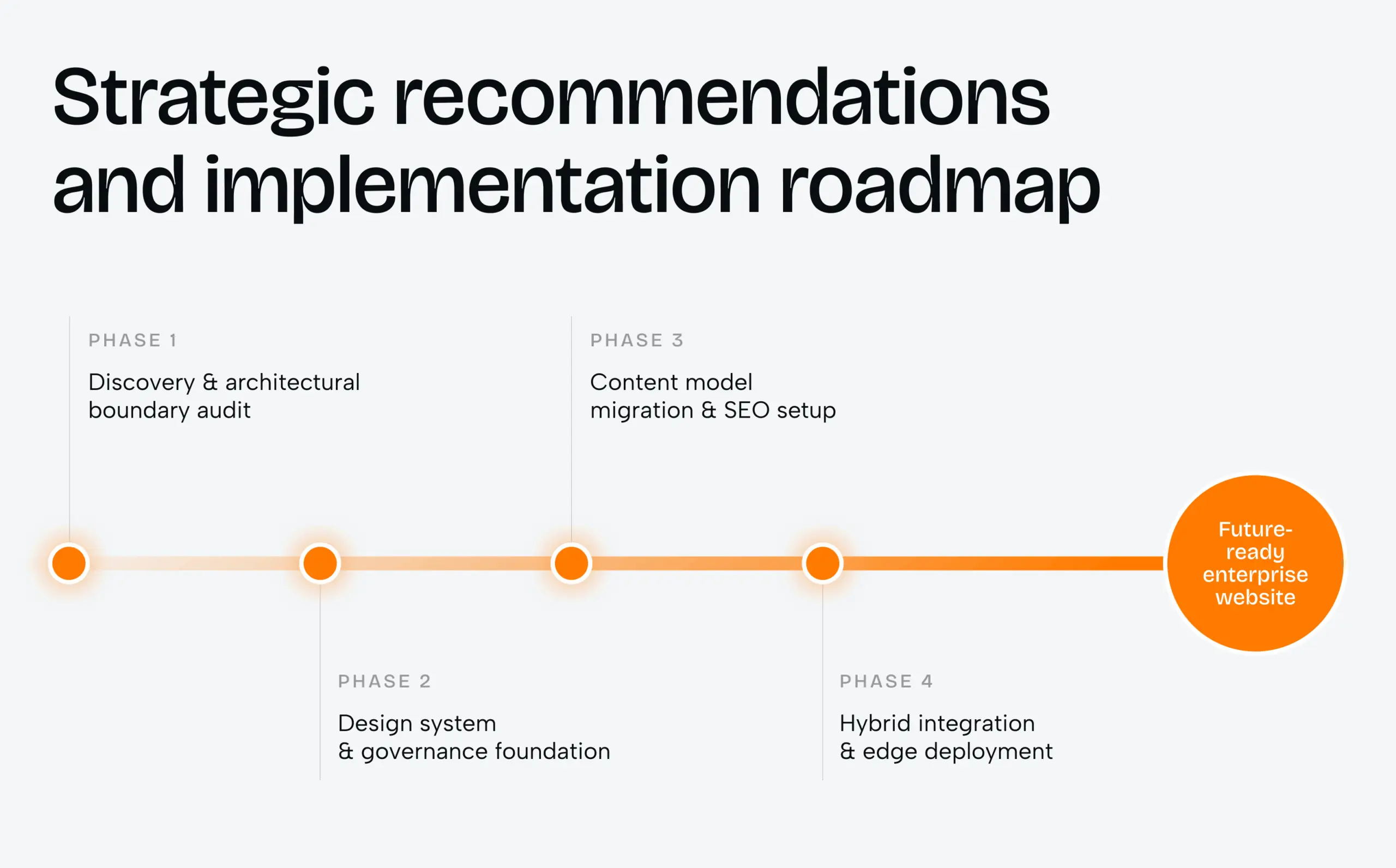
Phase 1: Discovery and architectural boundary audit
Leadership audits every requirement against the hard boundaries before anyone opens a design file. The audit confirms whether the property contains authenticated surfaces or a complex checkout. It also checks whether procurement mandates regional data processing. If application constraints dominate, the answer is a custom decoupled stack. If marketing velocity dominates, Webflow Enterprise goes ahead. We run this as a two-week discovery sprint, and its output is a signed-off architecture decision rather than a slide deck.
“The hardest single part of building a software system is deciding precisely what to build.”
Frederick P. Brooks Jr., software engineer and computer scientist (IEEE Computer, 1987)
Phase 2: Design system and governance foundation
Before the first page exists, the team builds a design system inside Webflow. Global class naming and a structured type scale come first, followed by a reusable component library. SAML SSO and SCIM provisioning go live alongside role-based access. Full seats stay with designers, and editors get limited seats that protect core layouts. Page branching is configured at this stage, so every new page gets reviewed before it ships.
Phase 3: Content model migration and SEO setup
Collections get designed around every recurring content type, from resource libraries to team directories. Migration scripts built on Webflow’s Data API then clean and transform legacy records before import. A planned CMS migration protects search authority only when 301 redirects and canonical tags are verified page by page. Sitemaps and schema markup get checked in the same pass, before DNS moves.
Phase 4: Hybrid integration and edge deployment
Interactive elements such as product sandboxes or calculators run as embedded web components connected to external microservices. Webflow stays the fast marketing presentation layer, while engineering hosts complex logic separately. The final step verifies domain routes and security certificates across Fastly and Cloudflare endpoints. That check is what makes the 99.99% SLA real rather than contractual.
Every roadmap reads cleanly on paper. A real launch shows where the same logic bends.
Case study: Bloom, a Webflow front door for a clinic that had not opened yet
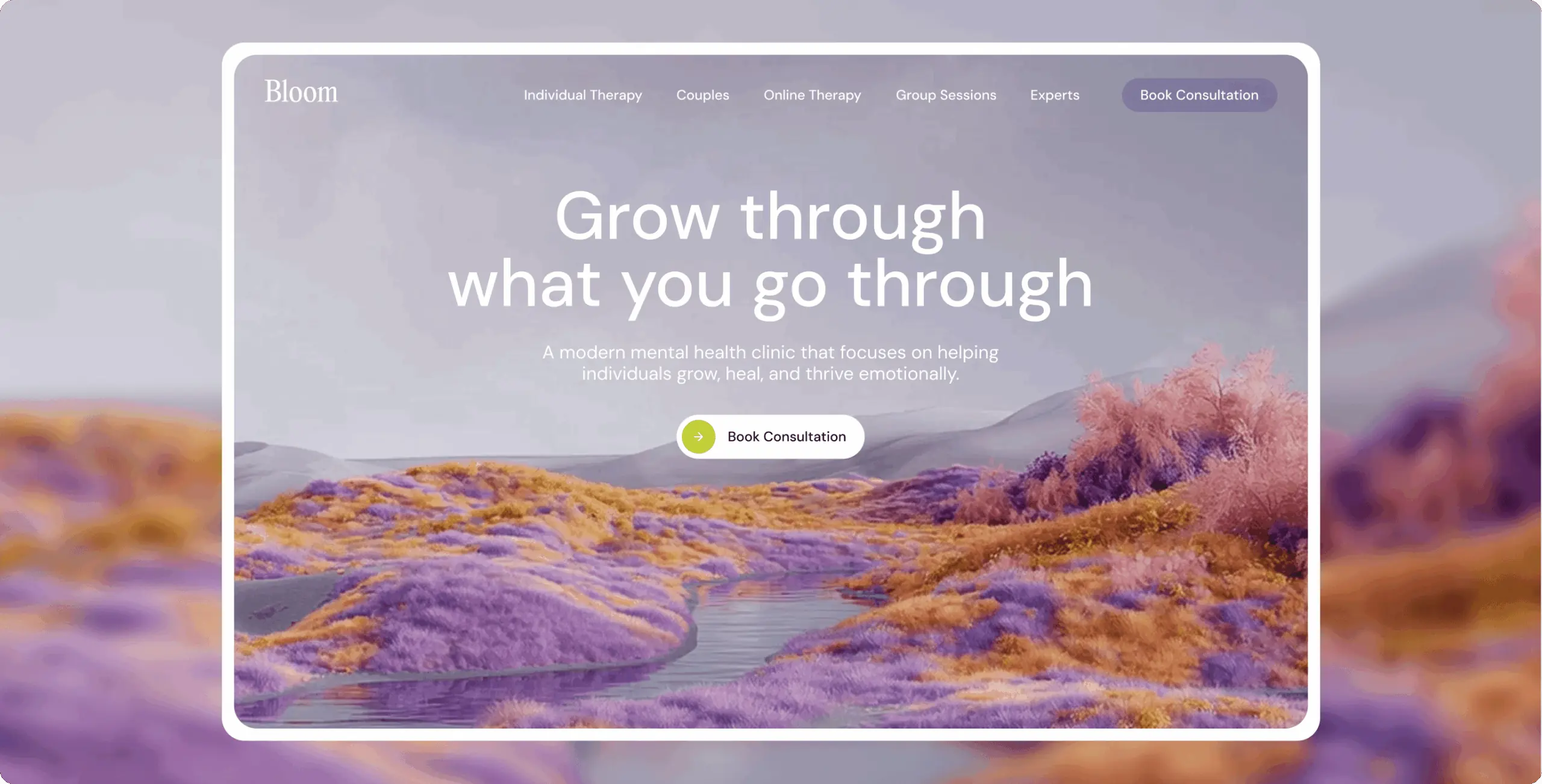
Bloom came to us as a new US mental health clinic with no patient base and no reviews. It was entering a category where competitors had operated publicly for years. Our competitor review found the same gaps on most clinic sites. Booking spread across several pages, and therapists appeared as an anonymous staff list. Service copy read like clinical shorthand rather than an explanation. We built the site around closing those gaps, and the clinic launched with every core path already in place.
Task. Build and launch a site from nothing for a clinic whose first impression had to carry all of its credibility. The brief set three connected goals for the launch. Services and specialists had to read in plain language. Visitors needed a real person to connect with before committing. Every unnecessary step between deciding to reach out and sending a request had to go, on desktop and on mobile.
Solution. Therapist catalog and profile pages lead with each specialist’s years of experience and focus area. Languages spoken sit right beside them. A visitor can verify a specialist before booking rather than after. Booking collapsed into one panel that carries the therapist summary and the contact form together. A submitted request shows its confirmation in place instead of redirecting. Underneath, the whole site runs on one connected Webflow structure. Every page from the homepage to the booking panel references the same therapist and service data.
Result. Bloom launched with a complete service-to-booking system already built. Services read in plain terms, and specialists appear by experience and focus area. The booking flow closes in one screen. Because every page reads from shared data, adding a therapist updates the catalog and booking flow without template drift. Bloom opened without a prior site or traffic baseline, so no before-and-after conversion figures exist. We do not publish numbers we cannot verify.
Bloom shows the Webflow case at its clearest. The site is a front door, not an application, and the content model fits comfortably inside Collections. A professional website development company should still mark the boundary early. Booking requests in healthcare can carry sensitive information. Scope the form handler against your compliance obligations before the first request goes live.
That kind of boundary call separates a good build partner from a fast one. A website design and development agency earns its fee on decisions like this, not on page count. Healthcare buyers should expect the same from any agency for website development. That judgment sits behind our full-cycle web development engagements, where design and engineering decide the architecture together.
Not every project ends as cleanly. The patterns below show where enterprise platform choices most often go wrong.
How to choose a website design and development agency for an enterprise build
Choose the website design and development agency that can argue against its own preferred stack. Shortlists for a website development company in the USA often run to five vendors, and this one test removes most of them. A partner that only sells Webflow or only sells custom code will fit your project to its offer.
Third-party evidence filters the field faster than portfolios do. Clutch publishes verified reviews with project budgets, so you can check whether a firm has shipped work at your scale. Phenomenon Studio holds a 5.0 rating on Clutch across 50+ verified reviews. Read the multi-year reviews first, because platform decisions show their quality in year two.
On the first working call, ask five things.
- Which of our requirements would push you to custom code, and which would not?
- What does year-two maintenance cost on each path, in dollars?
- Who on your team owns the redirect map and the content migration?
- How do you split full and editor seats so marketers cannot break the design system?
- Can you show a site you built on the other platform, and explain why it went that way?
A website development agency that answers all five without hedging has done this before. Our own website development agency team runs Webflow and custom builds under one roof, with 70+ mid-to-senior in-house experts across design and engineering. That structure removes the handoff where most platform migrations lose time.
The last question to settle is whether the answer needs to be either one at all.
Headless CMS or Drupal: alternatives website development and design companies propose
Two alternatives come up on most enterprise shortlists, and one of them is often the right answer for SaaS companies.
Webflow plus a custom app (hybrid). The marketing site lives on Webflow, while the logged-in product runs on a custom Next.js stack. This is the split we recommend most often for SaaS companies with live users. Marketing ships without engineering tickets, and engineering keeps full control of the product. The cost is two systems to keep visually consistent, which a shared design system solves.
Headless CMS with Next.js. This path fits when the same content must render in a mobile app and on the website. Expect the custom cost profile from the TCO table.
Drupal. Drupal suits organizations with in-house PHP skills and heavy governance needs. Its 24-month cost of $80,000 to $250,000 sits between the other two paths.
A capable web development company will place your site on one of these four paths within the first discovery week. If the recommendation arrives before anyone asks about logged-in users, treat it as a sales pitch rather than an assessment.
Most enterprise teams already know which side of the line their site sits on. Uncertainty about migration cost is what keeps old platforms running for years. Few website development and design companies will price both paths side by side, so we do it by default. Send us your current site and a short list of what it must do in year three. We will come back with a read on which path fits, and what the first two months would cost.
Bibliography
- Webflow. Pricing and plan specifications for Starter, Basic, Premium, Team and Enterprise plans. 2026. https://webflow.com/pricing
- Webflow. Enterprise security, compliance and governance features (SOC 2 Type II, ISO 27001, SAML SSO, SCIM, audit logs). 2026. https://webflow.com/
- Enterprise Web Architecture Evaluation: Webflow Enterprise vs. Custom Development. Research brief supplied for this article, 2026.
- Brooks, Frederick P., Jr. “No Silver Bullet: Essence and Accident of Software Engineering.” IEEE Computer, vol. 20, no. 4, 1987.
- Cunningham, Ward. “The WyCash Portfolio Management System.” OOPSLA ’92 Experience Report, 1992.
- Wikipedia. “Technical debt.” Accessed October 2026. https://en.wikipedia.org/wiki/Technical_debt
- Clutch. Phenomenon Studio company profile and verified reviews. Accessed October 2026. https://clutch.co/profile/phenomenon-studio
- Phenomenon Studio. Bloom: a booking-ready front door f
Share this article with friends



Oct 31, 2026
8 min read
Compare 2026’s top US healthcare web development agencies by compliance and rates, with real cost ranges and a checklist for picking a partner.


Oct 31, 2026
9 min read
Explore the best WordPress website development agency alternatives for enterprises in 2026. Compare platforms, costs, timelines, and expert partners.
