



Oct 31, 2026
9 min read
summary
See how our UI UX design agency repositioned Merchant Tech, an e-commerce operations platform, with workflow proof, pricing clarity and early trust signals.
Direct answer: The Merchant Tech website shows how a UI UX design agency wins merchant trust: positioning first, workflow proof second, pricing clarity throughout.
Key Takeaways
- Merchant Tech is an e-commerce operations platform for SMB merchants. We rebuilt its website story around one promise: a no-hassle platform.
- Our competitor review showed that Shopify and Wix sell website building and app ecosystems. Built-in business operations were open ground for a challenger.
- Complete merchant workflows, from sales tax handling to shipping operations, replaced isolated feature lists across the site.
- A comparable platform website engagement typically runs 1–2 months with a core team of 4–6 specialists.
Most e-commerce platforms lose merchants on the homepage, long before the free trial starts. A store owner scans three feature grids that look identical, then leaves to compare pricing somewhere else. Closing that gap is the real job of a UI UX design agency. In this case study, our team acts as a UI UX design firm and a full-cycle UX and UI design company at once. The UI UX design services behind Merchant Tech were strategic first and visual second.
Merchant Tech helps merchants run fulfillment and tax compliance from a single system. Analytics and product data sit in the same place, so owners stop stitching together disconnected tools. The product already worked well for its users. The website had not yet explained why that mattered to someone choosing a platform.
Our position on platform websites is simple. A commerce platform site should sell relief, not features. Merchants who switch platforms are buying fewer headaches, and the site has to prove that within the first scroll.
This article accompanies our YouTube video case study. It follows the same format as our 2026 product design showreel review and our case study on redesigning a safety app for seniors. You get the video and the decisions behind it, plus what a comparable engagement costs in 2026.
Watch the Merchant Tech video case study
Start with the Merchant Tech video case study on our YouTube channel. A video lets you meet the website the way a merchant does: in sequence, one screen after another. Section order and the moment pricing appears matter more in motion than in a row of screenshots.
We publish video case studies for a practical reason. Buyers comparing three to five vendors rarely read a full project page from top to bottom. Most of them will watch a few minutes of real work before a first call. Video also reaches operators who research on YouTube before they ever open an agency website.
The question we hear most from founders after they watch a showreel is direct. What actually changed for the business? This article answers that question for Merchant Tech, with one condition stated upfront. The published project page reports qualitative outcomes, so we report them the same way. We do not attach conversion numbers that were never part of the case.
What to look for while you watch
Four decisions carry most of the project. Each one is easier to spot on video than in a written summary.
- Where the positioning sits. The “No-Hassle Platform” promise leads the page, and product detail follows it.
- How workflows replace features. Look for complete tasks, such as handling sales tax, instead of a grid of icons.
- When trust appears. Platform proof and pricing clarity show up early in the scroll, not in the footer.
- How the structure splits visitors. Exploratory visitors and high-intent visitors get separate, clearly marked paths.
These four decisions are not visual tricks. They are answers to the questions a merchant asks before switching platforms. The video shows the answers, and the sections below explain where each one came from.
Watching gives you the quick version of the story. Reading is how you judge whether the same thinking fits your own product.
Design UX UI: why Merchant Tech started with positioning, not pixels
Every design UX UI project on a platform website starts with one decision: what the product should be known for. For Merchant Tech, the risk was visible in the first brief. The product could easily read as another generic ecommerce platform competing on features rather than business outcomes.
Feature competition is a losing game for a challenger. Established platforms have years of feature depth and a marketplace of add-on apps behind them. A newer platform cannot win a feature count, so it has to win on meaning instead.
We repositioned Merchant Tech around a clear “No-Hassle Platform” promise. That promise rests on three commitments, and every page decision had to support at least one of them:
- Operational simplicity. Fulfillment and tax compliance live inside the platform, not in a stack of separate tools.
- Transparency. Pricing and platform proof appear early, before the merchant has to ask.
- Fewer third-party dependencies. Built-in operations reduce the number of apps a merchant pays for and maintains.
The audience shaped the tone as much as the message. Merchant Tech speaks to SMB owners frustrated by hidden costs and complex setups. Those readers have been sold “easy” before, so the site had to show ease rather than claim it.
“Design is not just what it looks like and feels like. Design is how it works.” Steve Jobs, quoted in The New York Times Magazine (Rob Walker, 2003)
For a platform website, “how it works” means how fast a merchant understands the offer. It also means how confidently they move from curiosity to signup. Visual polish matters only when it serves that path.
Our team treats UI design and UX structure as one conversation for exactly this reason. On Merchant Tech, every wireframe round was judged against one question: does a merchant understand the product faster than before?
UI and UX design: two layers of one decision
In practice, UI and UX design answer different questions, but they fail together. The UX layer decides what appears on the page and in which order. The UI layer decides whether that sequence feels calm and easy to scan.
First impressions of a website form almost instantly. A study in Behaviour & Information Technology found that users judge a web page’s visual appeal within about 50 milliseconds (Lindgaard et al., 2006). That judgment then colors how they read everything below it.
According to the Stanford Web Credibility Project, 46.1% of participants assessed a site’s credibility by its visual design. (Fogg et al., Consumer WebWatch, 2002)
For a platform asking merchants to move their operations, credibility is the whole sale. That is why Merchant Tech’s interface avoids loud marketing visuals. Typography and content hierarchy carry the message, while product previews show the real tool at work.
On a commerce platform, good UI and UX design also respects the reader’s time. Each section answers one question and hands the merchant to the next one. Nothing on the page asks them to decode a slogan.
This positioning-first approach works best when a product already exists and the team can describe real workflows. For a pre-launch concept with no live product, we start with product discovery instead. Positioning built on guesses tends to collapse at the first sales call.
Positioning is still only a claim. The case study below shows how each claim turned into a concrete page decision.
Merchant Tech case study: task, solution, result
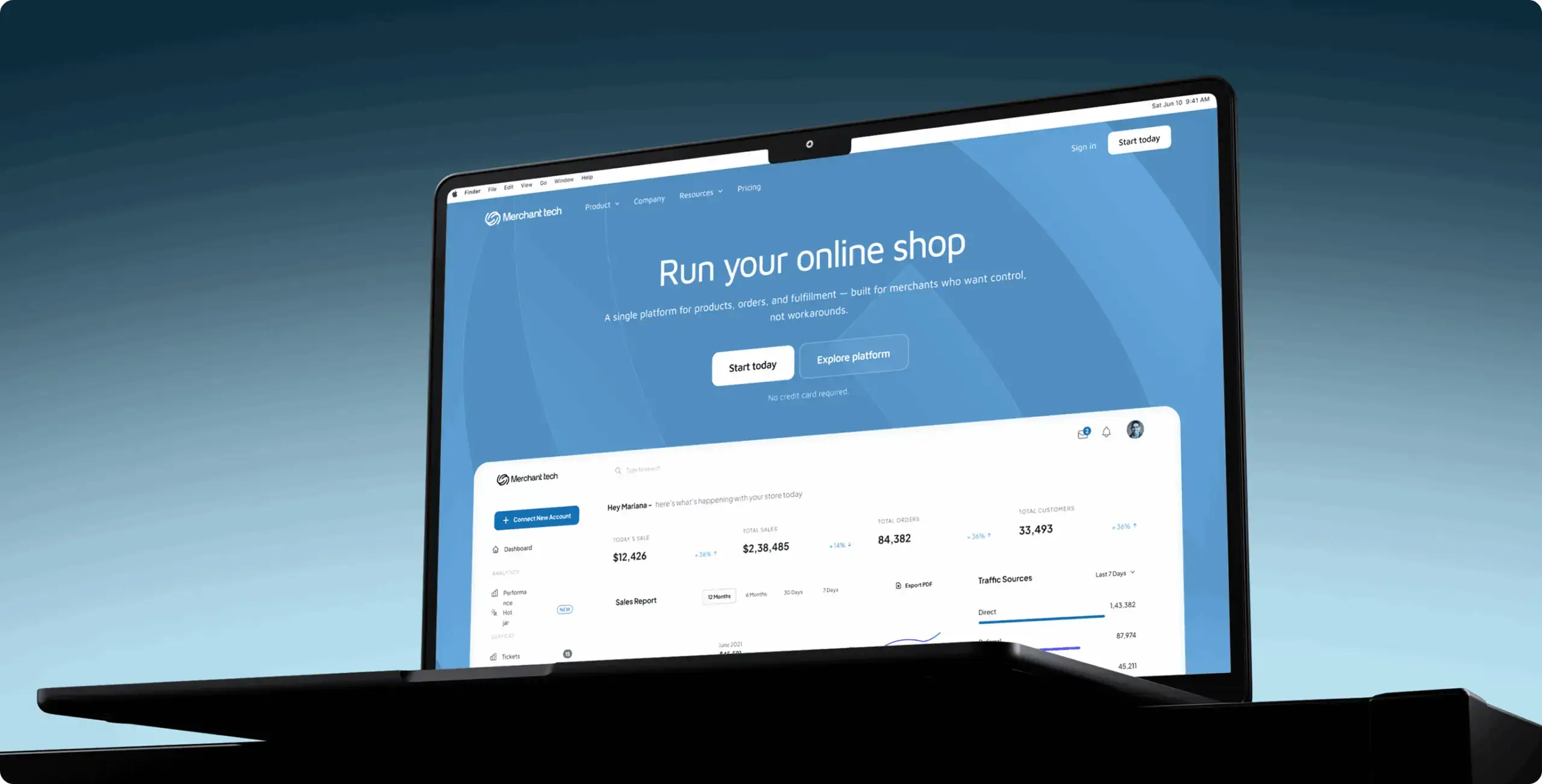
The client, Tyler Ussery, came to us with a product that worked and a website that undersold it. Our teams had collaborated before, so planning and stakeholder alignment were settled early. That freed the project to focus on product strategy instead of process. Merchant Tech already handled fulfillment and tax compliance for its merchants. The website simply did not explain why a store owner should care.
The work below follows the order the project actually ran. Each part maps to a decision you can see in the video.
Task
Merchant Tech needed a website that explains how the platform removes everyday e-commerce friction for SMB merchants. The brief covered several connected goals:
- Show, in merchant language, how the platform handles shipping management and sales tax compliance.
- Explain how centralized reporting replaces fragmented data from disconnected tools.
- Present the merchant portal as the place where owners see critical business data and daily workflows instantly.
- Separate Merchant Tech from feature-led ecommerce platforms in a crowded category.
The core value proposition was relief. Merchants should spend less time on logistics and compliance paperwork, and more time growing the business. The website had to communicate that relief and earn enough trust to move visitors toward product adoption.
Solution
Our team ran research and design as one engagement, with site structure as the bridge between them. The table below pairs each challenge with the change we made and its value for a merchant evaluating platforms.
| Challenge | What we changed | Why it matters to a merchant |
| The product risked reading as another generic ecommerce platform | Repositioned the site around a “No-Hassle Platform” promise focused on simplicity and transparency | The merchant understands the difference before comparing features |
| Competitors rely on feature lists that hide real-world value | Showed inventory and sales tax workflows end to end instead of as isolated features | The merchant sees their own day-to-day tasks on the page |
| Trust concerns and migration fears slow down switching | Added stronger trust elements and product demonstrations, backed by educational content | Switching feels like a manageable step, not a gamble |
| Pricing uncertainty causes hesitation | Brought pricing communication forward and made it clearer | The merchant can estimate cost without a sales call |
| Exploratory and high-intent visitors need different routes | Structured the homepage and supporting pages into clear paths | Each visitor reaches the next step faster |
The design phase moved through three stages. Wireframes explored multiple content structures before we fixed the final flow. Design direction concepts tested different homepage narratives against Shopify and Wix. Final mockups then set the content hierarchy and typography, with product previews placed to reduce cognitive load.
Result
The final website moved Merchant Tech from a feature-focused platform to one built around operational simplicity and merchant relief. The published case reports three outcomes.
- Clear product positioning. Merchant Tech now reads as a no-hassle commerce platform for SMB owners tired of hidden costs and third-party app dependency.
- Faster path to trust. Trust signals and pricing transparency now appear earlier in the customer journey, alongside platform proof.
- Simpler decision making. Merchants quickly understand what the platform does and why it differs from traditional ecommerce platforms.
The project also set a clearer foundation for customer acquisition and reduced friction across the evaluation journey. These outcomes are qualitative in the published case, so we report no numbers here. Across our wider portfolio, product redesign and UX optimization have delivered 35%+ conversion rate improvements. That figure describes our track record, not this specific project.
The full Merchant Tech website case study shows the wireframes and final screens in detail.
Two decisions that made the biggest difference
Looking back, two choices shaped the project more than any visual detail. The first was exploring several wireframe directions before committing to one. Each direction tested a different way to present positioning and trust, so the final flow won against real alternatives.
The second was building the homepage around workflows rather than capabilities. That single structural choice changed how every section below the first screen reads. It also gave the design team a clear test for each new block: does this show a merchant finishing a real task?
Who this approach fits
A positioning-led website project fits operating companies whose product has moved ahead of their marketing. Typical signs include loyal customers alongside weak trial conversion. Another sign is a sales team that spends every first call re-explaining the basics.
The approach fits less well when the product itself still changes every month. In that case the website story would need rewriting each quarter, and a lighter landing page serves better until the product settles. Most of our work in SaaS and FinTech falls into the first group, which is why we treat positioning as the starting point rather than an optional extra.
One lesson travels well beyond this project. When a product already works, the website problem is usually a translation problem. The research behind Merchant Tech shows where that translation started.
What competitor research revealed about how merchants choose a platform
Merchants do not choose a platform by counting features. They choose by asking what the platform will cost them in money and in risk. Our research for Merchant Tech focused on that decision rather than on the interface.
The research phase examined how small and mid-sized merchants compare ecommerce solutions. We looked at what creates trust during evaluation and which factors push a merchant toward adoption. Pricing transparency and migration concerns came up again and again. So did the tension between built-in functionality and third-party app ecosystems.
“Pay attention to what users do, not what they say.” Jakob Nielsen, Nielsen Norman Group (2001)
Nielsen’s rule shaped how we read the evidence. Merchants often say they want more features. Their behavior during evaluation shows they want fewer surprises.
Top 5 trust signals a commerce platform website needs in 2026
Merchants trust a platform when its website answers their risk questions before they ask them. Five signals do most of that work. Merchant Tech’s new site brings each of them forward in the scroll instead of leaving them for the footer.
- Transparent pricing. A visible starting price or clear tiers beat a “Contact sales” button for SMB buyers. Merchants who cannot estimate their bill assume the worst.
- Real product proof. Product previews and demonstrations show the actual tool at work. Abstract illustrations ask the merchant to take the product on faith.
- Migration reassurance. Switching platforms is the biggest fear in this category. A short, honest explanation of what moving involves lowers that barrier more than any slogan.
- Third-party validation. Independent reviews and recognizable partners carry more weight than self-description. For agencies, Clutch plays this role; for platforms, merchant reviews and integrations do.
- Educational content. Guides and resources show that the company understands merchant problems beyond its own product. They also give exploratory visitors a reason to return.
Order matters as much as presence. A trust signal placed after the pricing section arrives too late, because the doubt has already formed. On Merchant Tech, trust signals and platform proof sit earlier in the customer journey for exactly that reason.
One condition applies to all five. Trust signals only work when they are real. An invented review or a borrowed logo wall costs more credibility than an empty section ever could.
Signals like these come from a defined set of services. The next section shows what those services are and how long each one takes.
Best UI UX design services for a commerce platform website
The best UI UX design services for a platform website deliver a decision, not a set of screens. Merchant Tech did not need a prettier homepage. It needed a site that told merchants, in seconds, why this platform makes their week easier.
That outcome depends on several services working as one sequence. Each one answers a different business question, and skipping any of them pushes risk into the next stage.
| Service | Business question it answers | What you receive | Typical timeline |
| Positioning and messaging workshop | What should buyers remember about us? | A value proposition and a message hierarchy | 1–2 weeks |
| Competitor and UX research | How do buyers compare us with alternatives? | Competitor map, trust drivers, adoption barriers | 1–2 weeks |
| Information architecture and wireframes | What appears, in which order, for whom? | Sitemap, page flows, tested wireframe directions | 1–2 weeks |
| UI design and design direction | How should the product feel at first glance? | Design concepts, final mockups, component library | 2–3 weeks |
| Development and launch | Does the live site match the approved design? | Production website, QA, launch support | 2–4 weeks |
The timelines overlap in practice, which is why a full engagement typically lands at 1–2 months rather than the sum of each row. Research and wireframes often run in parallel during the first weeks.
Why buyers bundle research with design
Research without design produces a deck nobody implements. Design without research produces a beautiful page built on assumptions. The strongest UI & UX design services keep both inside one team, so findings shape wireframes the same week they appear.
On Merchant Tech, competitor findings went straight into wireframe directions. Each early concept tested a different way to present positioning and workflow proof. The team compared them before committing to the final flow.
“Good design is as little design as possible.” Dieter Rams, Ten principles for good design
Rams’ principle fits platform websites unusually well. Every extra visual element competes with the product story for the merchant’s attention. On Merchant Tech, we cut decoration so that product previews and workflows could do the persuading.
Where branding fits
Some studios sell UI UX branding design services as a separate track. For an operating platform, we prefer to treat brand expression as part of the interface work. A typeface and a color system both need to survive inside the product, not just on the homepage.
In our experience, UI UX branding design services earn their cost when a company changes its positioning, as Merchant Tech did. The visual language then has to signal the new promise. For Merchant Tech, that meant a calm, reliable feel instead of loud ecommerce marketing.
If your platform needs a new marketing site rather than a full product overhaul, our website design services for SaaS and commerce platforms cover the same sequence at website scope.
The services decide what gets built. Who builds it, and under which contract, matters just as much.
UI UX design firm, in-house team or freelancers: which fits a platform website?
For a positioning-led website like Merchant Tech’s, an outside UI UX design firm is usually the faster and safer choice. The work crosses strategy and research, then interface design and code, all in a short window. Few in-house teams have every one of those skills free at the same time.
That does not make an agency right for every company. The comparison below shows where each model performs best.
| Factor | UI UX design firm | In-house design team | Freelance designers |
| Time to start | 1–3 weeks after scoping | 2–4 months of hiring | Days |
| Research capacity | Dedicated researchers on the project | Limited by headcount and roadmap | Usually one person, one method |
| Positioning and strategy | Part of the engagement | Depends on product marketing maturity | Rarely included |
| Engineering handoff | Strong when developers sit on the same team | Strong when co-located with engineers | Often files only |
| Cost profile | Project fee or monthly retainer | Fixed salaries plus tooling | Hourly, lowest entry cost |
| Best for | Repositioning, redesigns, new platform sites | Steady iteration on a mature product | Narrow tasks with a clear spec |
As the table shows, the decision turns on scope rather than price. A freelancer can polish a landing page. A repositioning project needs research and design under one owner, which is where a firm earns its fee.
UI UX design agency: when it pays off and when it does not
Hiring a UI UX design agency pays off when the problem crosses disciplines your staff does not cover. Merchant Tech needed research-backed positioning and conversion-focused design in one coordinated push. An internal team would have needed months to assemble that mix.
An agency is the wrong call in two common situations. If your product has one core flow and a stable message, a strong in-house designer plus a short audit often wins. If you have no budget for discovery, an agency will end up guessing, and guesses resurface as a second redesign within a year.
How to judge a UI UX design company before you sign
Portfolios all look good, so judge evidence instead. A credible UI UX design company can name the client and the constraint behind each screen. Ask every candidate for one case with a published outcome, and ask who will actually do the work.
Independent review platforms help filter the shortlist. Clutch publishes verified client reviews and project details for design agencies, which makes claims easier to check. Phenomenon Studio holds a 5.0 rating on Clutch across 50+ verified reviews and is listed as a Clutch Top Design & Development Company.
Credentials only matter when they match your category. Our team works mostly in SaaS and FinTech, alongside Healthcare and EdTech. Merchant Tech sits at the edge of SaaS and commerce operations, which is familiar ground for us.
The question we hear most from heads of product sounds simple: why did the last agency’s work fall apart in production? The honest answer is usually a handoff gap rather than a talent gap. Static files arrive without components, and engineers rebuild every state from guesswork.
That is why we offer full-cycle UI UX design services with design and development in one team. Choosing a UI UX design services company that also builds removes the most common failure point. The next section explains why that matters for a live website.
Speed is part of the user experience
A conversion-focused website loses its advantage if it loads slowly. Merchants evaluating platforms on a phone will not wait for heavy hero animations.
According to Google research, 53% of mobile site visits are abandoned when a page takes longer than three seconds to load. (Think with Google, 2016)
This is where design and engineering decisions meet. A designer who knows the performance budget chooses lighter visuals from the start. A developer who understands the message knows which elements must load first.
Phenomenon Studio is a Webflow Professional Partner, which matters for marketing websites that change often. Webflow lets a marketing team update pricing or add resources without a developer ticket. For a challenger like Merchant Tech, that speed of iteration keeps the website aligned with the product.
What full-cycle delivery looks like in practice
Teams buying UI UX design & development services from one partner should expect a specific working rhythm. In our projects, it usually looks like this:
- Designers and developers join the same kickoff and review the same research findings.
- Developers review wireframes early to flag anything expensive to build.
- Design ships as a component library with documented states, not as flat screens.
- QA compares the live site against the approved design before launch.
Our team includes 70+ mid-to-senior in-house experts, so the developer on a project works next to the designer rather than in another company. Across hundreds of delivered products, that proximity has saved more time than any tool.
There is a limit worth stating. Full-cycle delivery helps most when the website and product share a roadmap. If your engineering team already owns the front end and has capacity, design-only UI UX design development services can be the leaner choice.
A new website is not always the answer, though. Sometimes the existing site needs a redesign, and sometimes it only needs a diagnosis.
Redesign or rebuild: how to decide what your platform website needs
Redesign when the message is right but the delivery is weak. Rebuild when the message itself is wrong. Merchant Tech fell into the second group, because the old framing competed on features instead of outcomes.
Most operating companies sit somewhere between the two. The table below shows the signals we use to place a website on that spectrum.
| Signal on your current site | What it usually means | Recommended path |
| Visitors bounce from the homepage without scrolling | The first screen does not state a clear promise | Positioning work, then a homepage rebuild |
| Traffic is healthy but demo or signup requests are low | Proof and pricing appear too late in the journey | Structural redesign of key pages |
| The design looks dated next to competitors | Visual language lags behind the product | Visual redesign on the existing structure |
| Marketing needs developer tickets for small updates | The build blocks iteration | Rebuild on a CMS such as Webflow |
| Sales calls repeat the same basic questions | The site does not answer real objections | Content and structure redesign |
A full rebuild costs more upfront and carries more launch risk. It is still the cheaper option when the positioning is wrong, because polishing the wrong message only spreads it further.
For teams with a sound message and a tired site, our website redesign services focus on structure and conversion without restarting the brand from zero.
Both paths share one risk: deciding before you know where the website actually fails.
UX audit: the lowest-risk first step before any redesign
A UX audit tells you what is broken before you pay to fix it. For most platform websites, it is the cheapest decision in the whole process. It also tests how a design partner thinks before you sign a larger contract.
The business case for design is well documented. McKinsey tracked 300 publicly listed companies over five years for its Design Index. The top-quartile design performers achieved 32 percentage points higher revenue growth than their industry peers (McKinsey & Company, 2018).
Usability problems are also cheaper to find than most teams assume. Jakob Nielsen’s research shows that testing with five users uncovers about 85% of usability problems in an interface (Nielsen Norman Group, 2000). A focused audit does not need a large panel to produce useful findings.
What a website UX audit covers
A useful audit looks at behavior and content together. In our audits for platform websites, the work usually includes:
- Analytics review of the conversion funnel and drop-off points between key pages.
- Heatmap and session analysis to see where merchants hesitate or abandon.
- Heuristic review of navigation and content hierarchy, including every call to action.
- Competitor comparison of positioning and pricing presentation against your closest rivals.
- A prioritized backlog ranked by business impact and implementation effort.
The output should be a backlog your team can act on, not a slide deck of observations. A focused audit of one website typically takes 2–4 weeks.
When an audit is not enough
An audit diagnoses problems inside an existing direction. It will not invent a new positioning on its own. If the audit shows that visitors misunderstand what your product does, the next step is strategy work, as it was for Merchant Tech.
Our UX design audit follows exactly this logic. It ends with one clear recommendation, whether that means fixing pages in place or rethinking the positioning.
A clear diagnosis also makes the budget conversation easier. Once you know the scope, the cost question has a concrete answer.
How much do UI UX design services cost in 2026?
A platform website project like Merchant Tech’s typically costs between $15,000 and $60,000 in 2026. The range depends on how much strategy work the project needs and whether development is included. Most engagements of this kind take 1–2 months.
Hourly rates vary widely by region and seniority. Clutch groups design agencies into hourly bands, and established US-facing studios usually list $100 to $199 per hour. Nearshore and European teams with senior staff often sit lower for the same scope.
The table below gives indicative ranges for common service packages. Treat them as planning numbers, not quotes, because final scope always shifts the price.
| Service package | Typical scope | Indicative cost (2026) | Typical timeline |
| UX audit | Analytics, heuristic review, prioritized backlog | 5,000–15,000 | 2–4 weeks |
| Website design | Research, wireframes, UI for 8–15 pages | 15,000–40,000 | 4–8 weeks |
| Website design and development | Design plus Webflow or custom build, QA, launch | 30,000–60,000 | 6–10 weeks |
| Positioning-led website rebuild | Strategy, research, full design and build | 40,000–80,000+ | 8–12 weeks |
| Ongoing design support | Monthly design and iteration capacity | From $4,000 per month | Ongoing |
Phenomenon Studio’s Clutch profile lists a minimum project size of $5,000+. That entry point usually covers an audit or a tightly scoped design sprint.
Who sits on the team
A comparable project usually runs with a core team of 4–6 specialists. Roles scale with scope, but a typical setup looks like this:
- Project manager. Owns the timeline and budget, plus communication with your stakeholders.
- UX researcher or strategist. Runs competitor analysis and turns findings into positioning and structure.
- UI designer, sometimes two. Builds design directions and mockups, then the component library.
- Front-end or Webflow developer. Turns approved designs into a fast, editable production site.
- QA specialist. Checks the live site against the design across devices before launch.
Smaller audits may need only two or three of these roles. Larger rebuilds can add a second developer or a dedicated content specialist.
What actually moves the price
Three factors drive most of the variation we see in quotes. Each one is worth clarifying before you request proposals.
The first factor is strategy depth. A project that needs new positioning, like Merchant Tech, costs more than a visual refresh. That extra research is also where most of the business value sits.
The second factor is page count and template variety. Ten pages built from three templates cost far less than ten unique layouts.
The third factor is development scope. A Webflow build with standard integrations stays within the ranges above. Custom integrations with product data or a merchant portal can extend both budget and timeline.
Companies supported by Phenomenon Studio have raised $500M+ in funding. For many of them, the website was the first surface investors and customers saw. A clear quote starts with a clear scope, which is also where most hiring mistakes begin.
Common mistakes when hiring a UI & UX design services company
Most failed website projects fail during procurement, not in Figma. The mistakes below come up repeatedly in projects we inherit from other vendors. Each one is cheap to avoid and expensive to repair.
- Briefing for visuals when the problem is positioning. A beautiful homepage built on a feature list still reads like every competitor. Merchant Tech needed a new promise before it needed new screens.
- Hiding the price until the sales call. Merchants and B2B buyers treat missing pricing as a warning sign. Even a starting price or a clear range builds more trust than a “Contact us” button.
- Listing features instead of showing workflows. Buyers cannot picture value from icons and labels. A complete task, shown start to finish, does more than ten feature tiles.
- Splitting design and development across vendors. Every handoff adds a layer where intent gets lost and timelines slip.
- Skipping research to save two weeks. The rework that follows usually costs more than the research would have.
- Signing without a definition of done. Agree upfront on which metrics the new site should move and how you will measure them.
One more mistake deserves its own line: judging the vendor by the sales team. The people on the first call are often not the people who will design your product. Ask to meet the designers and developers, and ask how long they have worked together.
The last point on that list matters more than it looks. Without a baseline, nobody can prove the website paid off. Demo requests and signup rate are easy to measure in week one, and they turn the next budget conversation into a discussion of evidence.
Choosing a UI UX design services company is ultimately a bet on judgment. Portfolios show taste, while process questions show judgment. Ask each candidate how they would decide what goes on your homepage, and listen for research before pixels.
Share this article with friends


Oct 31, 2026
7 min read
Explore how our web design services helped Vita Travels launch an award-winning wellness marketplace with custom UI/UX design and Webflow development.


Oct 29, 2026
6 min read
Discover five warning signs your design system is holding your team back and learn how to evolve it for faster decisions, consistency, and scalability.
