



Oct 18, 2026
9 min read
summary
Learn how to design HIPAA-compliant healthcare apps in 2026. Explore UX best practices for patient privacy, secure analytics, accessibility, and usability.
Direct answer: HIPAA-compliant UX design builds the required privacy safeguards into a product’s core flows, so patients and clinicians meet security checks only where the risk is real.
Key takeaways
- HIPAA asks for “reasonable and appropriate” safeguards. Automatic logoff is an addressable specification under 45 CFR § 164.312, so a blanket two-minute timeout is a design choice, not a legal mandate.
- The HIPAA Security Rule update HHS proposed in January 2025 would require multi-factor authentication with limited exceptions. Passkeys meet that bar with one biometric tap.
- HHS OCR says tracking technologies on patient portals and in mobile apps generally have access to PHI. A June 2024 court ruling vacated only the part about public, unauthenticated pages.
- Phenomenon Studio redesigned the Wisdom care platform in two sprints. The interface won Red Dot 2026 in app design, and the client closed a $1.3M pre-seed round.
Oleksandr Kostuchienko | Marketing Manager, October 2026
Why does HIPAA compliance make healthcare products harder to use?
Compliance makes products harder to use when security controls get bolted onto finished screens. The law itself rarely demands that friction.
Most teams meet HIPAA late. The design is approved and the build is underway when a security review adds a pop-up here and a forced logout there. Each control is defensible on its own. Together they create click fatigue for clinicians and a patient portal people quietly stop opening.
The question we hear most often from healthtech founders sounds simple: will compliance make our app feel like a tax form? It does not have to. The HIPAA Security Rule asks covered entities and business associates for “reasonable and appropriate” safeguards around electronic protected health information (ePHI). Nothing in it requires treating every legitimate user as a suspect.
Phenomenon Studio designs from that reading. Our own HIPAA and GDPR compliance program is independently assessed, so privacy rules shape wireframes in week one instead of arriving as a punch list after launch.
| Dimension | Consumer UX | Healthcare UX |
| Cost of a usability error | Churn and lost conversions | Wrong documentation, delayed treatment, clinician burnout |
| Regulatory surface | General privacy and consumer protection law | HIPAA Privacy, Security and Breach Notification Rules; Section 504 accessibility; FDA human factors for devices |
| User roles | Usually one person | Patients, clinicians, admins, caregivers and payers |
| Accessibility baseline | Often a later enhancement | WCAG 2.1 AA required for HHS-funded recipients |
| Success metric | Session length and retention | Task completion under stress and error rate |
The gap widens with every extra user role. A single-user wellness tracker carries far less weight than a portal where a daughter manages her father’s medications and his cardiologist reviews the same record.
Login is where users feel this tension first. It is also where most teams overcorrect.
How should a healthcare app send push notifications without exposing PHI?
Keep the lock-screen message generic and reveal the details only after the user authenticates inside the app.
Picture a phone face-up on a breakfast table, with a preview that reads “Your biopsy results are ready.” Everyone at that table now knows something the patient may not have chosen to share. A reminder naming a specific antidepressant does the same through the drug name. HHS OCR is direct on the point: information collected by a regulated entity’s mobile app “generally is PHI.”
The fix is an architecture decision, not a copywriting trick:
- The server sends a neutral message, such as “You have a new update from your care team.”
- Clinical content stays encrypted on the backend and never travels in the notification payload.
- A tap opens the app, which asks for Face ID, a fingerprint or a passkey.
- The details load only inside the authenticated session.
Product leads often worry that vague copy will kill open rates. In practice, urgency comes from the action, not the diagnosis. “A message about your next visit is waiting” gets tapped without revealing why the visit exists.
Some patients want more detail on their lock screen. When someone explicitly opts in, record that choice and keep the setting one tap away so they can reverse it.
Notifications leak data one phone at a time. Analytics scripts can leak it from every visitor at once.
Which analytics setup is safe under HIPAA?
On any page or app screen that touches PHI, use server-side tracking you control or an analytics platform that signs a Business Associate Agreement (BAA). Default client-side pixels are the risky choice.
HHS OCR addressed this in its bulletin on online tracking technologies. It names cookies, web beacons and tracking pixels as the usual suspects. It also states that regulated entities must ensure all tracking technology vendors have signed a BAA, and that a BAA alone is not enough without a Privacy Rule permission for the disclosure.
“Tracking technologies on a regulated entity’s user-authenticated webpages generally have access to PHI.”
U.S. Department of Health and Human Services, Office for Civil Rights, bulletin on the use of online tracking technologies by HIPAA covered entities and business associates
On June 20, 2024, a federal court in American Hospital Association v. Becerra vacated one part of that guidance. The vacated part covered IP addresses collected on public, unauthenticated pages about health conditions. Do not read the ruling as a green light. Patient portals and mobile apps sit outside it, and HHS OCR says it is evaluating next steps.
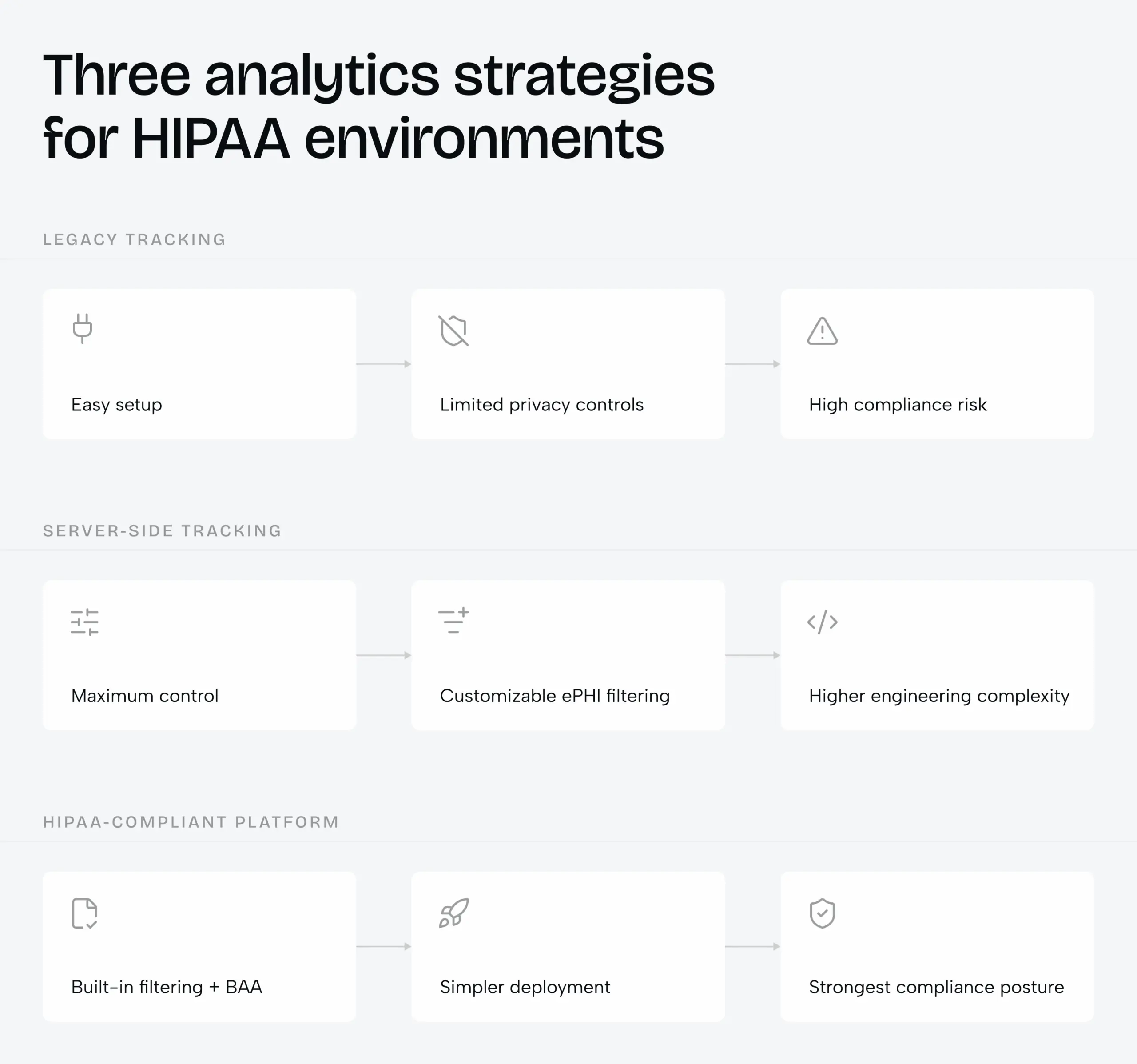
The infographic shows the trade-off at a glance. The table below adds what a buyer needs to choose between the three.
| Criterion | Legacy client-side tracking | Server-side tracking | HIPAA-compliant platform |
| Example | Default GA4 or Meta Pixel setup | Server-side Google Tag Manager in your own cloud | Freshpaint or Piwik PRO on a BAA-backed plan |
| Where the code runs | The visitor’s browser | Your server, inside a HIPAA-eligible cloud | The vendor’s secured platform |
| BAA coverage | Standard setups are not covered | Your cloud provider’s BAA | Signed by the analytics vendor |
| PHI filtering | Raw IPs and URL parameters leave the page | You strip IPs and redact parameters before forwarding | Filtering built in and configurable |
| Best fit | Public marketing pages with no health context | Teams with DevOps capacity and many downstream tools | Lean product teams that need a fast, defensible setup |
Our position is simple. For most early-stage healthtech products, a HIPAA-compliant platform is the right first bet. A server-side pipeline earns its engineering cost once you have a data team and several marketing tools to feed. Always confirm which pricing tier includes the BAA before you sign.
Picking the pipeline settles what you collect. Consent design settles whether users trust you to collect it.
Consent screens: clear choices vs dark patterns
A consent screen builds trust when declining is exactly as easy as accepting. Anything less reads as a trick, and health users notice.
Dark patterns in consent are familiar. The opt-out toggle hides three menus deep. The “Reject” button is pale gray text next to a bright “Accept all” button. Some sites go further with cookie walls that block basic health content until the visitor agrees to tracking.
Regulators treat health data sharing as a priority outside HIPAA as well. In 2023 the U.S. Federal Trade Commission took action against GoodRx and BetterHelp over sharing consumers’ health information with advertising platforms. Neither case needed a HIPAA violation to cost the companies money and reputation.
| Element | Dark pattern | High-trust pattern |
| Buttons | “Accept all” bright, “Reject” faded | Same size, weight and contrast for both |
| Choices | One bundled yes or no | Separate toggles for essential and optional tracking |
| Access | Content blocked until the user agrees | Health content readable without tracking consent |
| Language | Legal paragraphs nobody finishes | One plain sentence on what is collected and why |
| Changing your mind | Setting buried in account menus | A privacy link visible in every footer and settings screen |
Plain microcopy does most of the work. “We count page visits to improve the app. We never sell or share your health information.” Two sentences like these answer the question users actually have.
In our experience, the consent screen is the first place a patient decides whether a product respects them. The decision carries into every screen that follows, especially the long forms.
How do you design for patients, clinicians and caregivers at once?
Give each role its own priorities on screen while one permission model governs what each person can see. Patients need calm, clinicians need speed, and caregivers need clear limits.
Patient intake that people finish
Long single-page intake forms fail people who are anxious, in pain or unfamiliar with medical terms. Progressive intake breaks the form into short, single-topic steps with a visible progress indicator. Conditional logic hides questions that do not apply, so a patient booking a dermatology visit never scrolls past cardiology history.
Error messages should say how to fix the problem. “Enter a 10-digit phone number” beats “Invalid input” every time. Inline tooltips that translate clinical terms into plain language also improve the accuracy of what patients report.
Clinician screens built for scanning
For clinicians, information hierarchy is a patient safety issue. Severe allergies and critical lab values need their own visual containers with high-contrast type and an icon. Color alone is never enough, because color-blind clinicians must read the same alert.
Accessibility is now a legal floor for many healthcare organizations, not a nice-to-have.
HHS requires recipients of its federal funding with 15 or more employees to meet WCAG 2.1 Level AA for web content and mobile apps from May 11, 2026. Smaller recipients follow on May 10, 2027. (HHS Office for Civil Rights, 2024)
Proxy access for families and guardians
Proxy access covers parents managing a child’s account, adult children helping aging parents and legal guardians. The account owner should grant access task by task, for example scheduling without clinical notes. A revocation screen should list every active proxy and remove one with a single action.
Adolescent records add a time dimension. Privacy protections for minors vary by state, so the portal should adjust parental views automatically at the age thresholds your legal team defines. Medical work makes up 35% of Phenomenon Studio’s portfolio on Clutch, and these permission models are where we see healthcare projects stall most often. Our healthcare app design and development work starts by mapping every role before any screen exists.
The caregiver scenario is the hardest of the three. It is also the one we tested most closely on a recent project.
Case study: how Wisdom made a care platform calm enough to trust
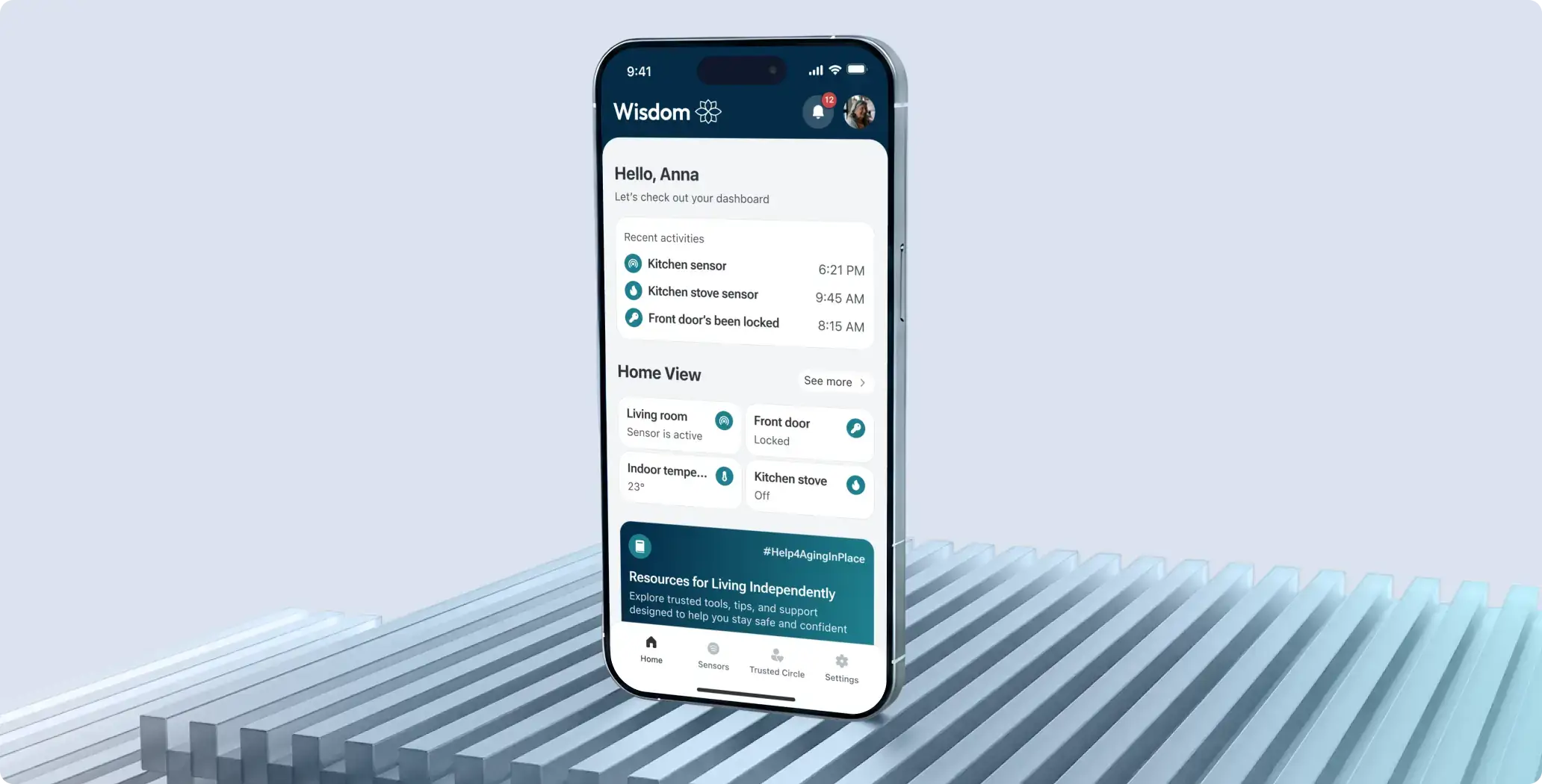
Wisdom proves that privacy-heavy care software can be simple enough for older adults and still win design awards. The US-based platform helps older adults live safely at home. Sensors and cameras detect falls or long inactivity and alert a circle of trusted people.
That is sensitive territory. Camera feeds from inside someone’s home, health signals and family roles all meet on one small screen. The trust problem looks very close to the one HIPAA-regulated products face.
Task
The client asked Phenomenon Studio to redesign the mobile part of its existing care platform. Older users found screens crowded, buttons small and labels unclear. Families needed the app to feel reliable in stressful moments. The new design had to feel calm and trustworthy without changing how the system worked underneath.
Solution
We started with research. Our team reviewed the existing app and analyzed four monitoring products: Ring, AlfredCamera, Faceter and Camy. The biggest insight was that most platforms protect property, not people. That pushed Wisdom toward support over surveillance.
The two-sprint redesign then delivered four core changes:
- Accessibility settings that let older adults switch to larger text or high contrast in a few taps.
- Trusted circle management to invite members, assign roles and control who gets notified in each situation.
- Smart alerts with escalation that reach trusted contacts first and emergency services if nobody responds in time.
- Room-by-room sensor and camera control, with camera feeds available only according to permissions.
After the redesign, our team built the cross-platform front end in Flutter. Some back-end workflows were still pending, which meant repeated redeployments and retesting alongside the client’s original developers.
Result
- Red Dot 2026 winner in app design, plus a separate UX Design Award nomination in 2026.
- $1.3M raised in a pre-seed round, with the working product demo in place.
- A strategic partnership with Samsung, which adapted its smartwatch firmware so the watch runs Wisdom in a dedicated single-app mode as an extra sensor.
- Usability testing with older adults and family caregivers confirmed that participants completed every tested flow without confusion.
The moment that convinced us came in those usability sessions. Participants had three tasks: adjust readability settings, invite someone to the trusted circle, and turn off a specific bedroom sensor. That last task is the privacy control that matters most to a person living with cameras at home. Participants finished it without asking for help, including those with limited tech experience. Privacy controls only protect anyone when people can find and use them.
The full Wisdom care platform redesign case study shows the screens and design system. Most teams that read it ask the same next question: what does a project like this cost?
How much does HIPAA-compliant UX design cost, and how long does it take?
A focused UX redesign of an existing healthcare app typically takes one to two months with a team of four to six specialists. Cost depends far more on the number of user roles and PHI touchpoints than on the number of screens.
The Wisdom redesign ran in two sprints before development started. That pace is realistic when the product already exists and the back end stays in place. A new platform built from scratch, with its own compliance architecture, needs a discovery phase first and a longer delivery plan.
What drives the budget
| Cost driver | Lower effort | Higher effort |
| User roles | One role, such as patients only | Patients, clinicians, admins and caregivers with proxy access |
| PHI touchpoints | Few screens show health data | PHI appears across forms, notifications and dashboards |
| Analytics | HIPAA-compliant platform with a BAA | Custom server-side pipeline feeding several tools |
| Accessibility | New product designed to WCAG from day one | Legacy app retrofitted to meet WCAG 2.1 AA |
| Integrations | Standalone app | EHR, wearables or third-party devices |
A typical team
- Product or project manager who owns scope and compliance checkpoints.
- UX researcher who runs interviews and usability tests with real patients or clinicians.
- One or two UI/UX designers who build the flows and the design system.
- Front-end and back-end engineers when the engagement continues into development.
Phenomenon Studio works in three models. A full-cycle partnership covers discovery through launch. A dedicated team takes a defined roadmap. Team extension adds our specialists to your existing crew. Every engagement is quoted after a discovery call, because two healthcare apps with the same screen count can differ several times in compliance scope.
Skipping discovery is the most expensive shortcut in regulated products. The rework does not show up in design fees. It shows up when a security review rejects a finished build. Clients can check our track record on Phenomenon Studio’s Clutch profile, where we hold a 5.0 rating across 52 reviews.
The budget conversation goes faster once you know which mistakes to avoid.
Six common mistakes that make compliant products hard to use
Most friction in healthcare apps comes from a handful of repeat decisions. Each one below has a cheaper alternative.
- Adding security after design approval. Controls bolted onto finished screens create pop-ups and dead ends. Map every PHI data point before the first wireframe instead.
- One timeout for every context. A two-minute logout on a personal phone punishes patients for no added safety. Scale timeouts by role and device.
- Diagnoses in push notifications. Lock screens are public. Send neutral alerts and reveal details after biometric sign-in.
- Default pixels on portals and apps. Standard marketing tags send identifiers to vendors without a BAA. Move to server-side tracking or a HIPAA-compliant platform.
- Treating accessibility as a later phase. Retrofitting WCAG 2.1 AA into a live app costs more than designing for it. For HHS-funded organizations it is already a legal deadline.
- Testing only with the internal team. Staff know where every setting lives. Test with real patients, clinicians and caregivers under realistic pressure.
None of these mistakes needs a bigger budget to fix. Each needs an earlier decision.
If your product sits between a strict compliance review and users who just want it to work, we can help find the friction that serves no one. Our healthcare app development services combine UX research, design and engineering under one roof, so compliance decisions and interface decisions get made by the same team. Discuss your project with us.
Bibliography
- U.S. Department of Health and Human Services, Office for Civil Rights. Use of Online Tracking Technologies by HIPAA Covered Entities and Business Associates. Bulletin, 2022; updated June 2024.
- U.S. Department of Health and Human Services. HIPAA Security Rule Notice of Proposed Rulemaking fact sheet. December 27, 2024.
- Federal Register. HIPAA Security Rule To Strengthen the Cybersecurity of Electronic Protected Health Information, 90 FR 898. January 6, 2025.
- Code of Federal Regulations. 45 CFR § 164.312, Technical safeguards (HIPAA Security Rule).
- American Hospital Association v. Becerra, No. 4:23-cv-1110 (N.D. Tex. June 20, 2024).
- U.S. Department of Health and Human Services, Office for Civil Rights. Section 504 fact sheet on accessibility of web content, mobile apps and kiosks. 2024.
- World Wide Web Consortium (W3C). Web Content Accessibility Guidelines (WCAG) 2.2. W3C Recommendation.
- U.S. Federal Trade Commission. Enforcement actions against GoodRx and BetterHelp over health data sharing. 2023.
- Clutch. Phenomenon Studio profile. Accessed October 18, 2026.
- Phenomenon Studio. Wisdom: a digital platform for safer, more connected aging. Case study, 2025.
Share this article with friends



Oct 18, 2026
9 min read
B2B web development that accelerates time-to-market. This b2b web development agency provides b2b web portal development with pre-built frameworks and dedicated design teams.


Oct 12, 2026
7 min read
UI UX design services trusted by high-growth startups. As a full-service ux design agency, our ux design ui design approach speeds up workflows by 2x and reduces time-to-market by 50%.
