
HIGH-END CRM SYSTEM DESIGN

Delivering custom CRM development services for teams outgrowing one-size-fits-all SaaS tools
Before your workflows get duct-taped into a third-party template your team gives up using, hire CRM developers who’ve already launched purpose-built platforms for complex, evolving operations - and reap the benefits.
Your next growth stage starts with the right CRM user interface design partner — at launch, or at scale

DESIGNING PRODUCTS FOR STARTUPS BACKED BY

phenomenon studio IN NUMBERS
500M+

investments raised by our clients

x2

avg projects per client — most come back

5.0

on clutch — 50+ reviews

35%

conversion lift — klickex case

KEY CRM USER INTERFACE DESIGN CHALLENGES

You’re here because your CRM is slowing your team down instead of helping them work smarter, right?
Chances are, you’ve already tried a few tools. Maybe added some plugins, maybe even paid for a redesign. But if your team’s still clicking in circles, something’s off. The truth? Most CRM systems are built around software features, not the way people actually work. That’s where our

CRM developer

s come in.

We’ve got sales in one tool, ops in another, and the rest of us are still stuck in email threads. It’s a mess.

We design CRMs that unify fragmented workflows without flattening how each team member works. Instead of forcing everyone into the same dashboard, we map shared logic and build role-specific views, so every team sees what they need, without losing the bigger picture.

We already tried building a CRM. It’s technically ‘done’, but no one’s actually using it.

We apply CRM user interface design principles that prioritize real-world clarity over feature clutter. From intuitive navigation to role-based simplicity, we test what drives daily engagement and cut what doesn’t. That’s how your team gets it on the first click and keeps using it.

Every CRM we’ve tried wants us to change how we work to fit the tool.

Most CRMs expect you to fit into pre-built structures. To deliver bespoke CRM development, we start with user personas, RICE prioritization, and interaction flows that mirror your internal logic. So when you get your platform, it already feels like second nature.
MORE ABOUT OUR CRM DEVELOPMENT SERVICES
From research to launch: everything you need to build a custom CRM that fits your team
The need for a custom CRM usually starts with too many roles, too many screens, and too little alignment. Our CRM application development services cover every step: mapping your workflows, defining the logic, and delivering the full CRM design and development in-house.
Mapping your operations, roles, and system needs before anything is drawn or built.
Product discovery
Define CRM goals, user journeys, and required logic based on team structure, workflows, and business constraints.
UX audit & roadmapping
Audit your current CRM or related tools to identify flow gaps, usability issues, and adoption blockers.
Technical workshop
Outline CRM system architecture, integrations, and back-end logic before moving into visual or interactive design.
Designing interfaces for clarity, control, and daily use across sales, support, and operations teams.
Design prototype
Create high-fidelity CRM prototypes to validate structure, permissions, and interface logic with real users.
Website design
Design CRM-connected websites for onboarding, lead capture, or client access portals.
Web app design
Build CRM dashboard designs with role-based layouts, task views, and structured data interaction logic.
Mobile app design
Design custom mobile CRM apps for reps, agents, or managers, with real-time data and task-level control.
Product redesign
Rework legacy CRM tools by cleaning up structure, improving task flows, and reworking core CRM design patterns.
Branding & identity
Apply consistent branding across your CRM user interface design, onboarding, and client-facing screens.
Delivering full-cycle bespoke CRM development, built to spec and ready to scale.
Custom MVP development
Test workflows and platform logic quickly with modular MVPs built by our CRM application developers.
Web development
Implement full CRM front- and back-end systems using scalable stacks like React, Node.js, or NestJS.
Website development
Develop CRM-connected websites for authentication, account portals, partner access, or lead gen.
Mobile app development
Build cross-platform CRM apps for field teams or internal use, aligned with live system data.
No-code development
Use Webflow, Bubble, or FlutterFlow to prototype or test CRM admin flows and back-office logic.
Blockchain development
Add smart contracts, audit trails, or access layers to CRM platforms using blockchain-based back-end tools.

TYPES OF CRM SYSTEMS WE BUILD

Each CRM type solves a different problem. We help you choose the right one
The success of your CRM depends on how well it mirrors your business, not how many features it includes. Our

CRM user interface design

process starts by identifying which CRM model fits your team’s needs, then builds around that with structure, usability, and clear role logic.
01
Operational CRM
Streamline daily workflows, automate tasks, and structure pipelines with role-based CRM dashboard design and CRM designation rules.
Operational CRM

Best for sales teams, account managers, and companies investing in CRM app development to improve execution.

Let's discuss

Best for sales teams, account managers, and companies investing in CRM app development to improve execution.

Let's discuss
02
Collaborative CRM
Unify internal communication, connect departments, and centralize interactions across marketing, support, and sales using business services CRM logic.
Collaborative CRM

Ideal for service-driven businesses, B2B organizations, and teams using CRM and customer service systems together.

Let's discuss

Ideal for service-driven businesses, B2B organizations, and teams using CRM and customer service systems together.

Let's discuss
03
Analytical CRM
Collect, process, and visualize customer behavior, performance metrics, and forecasting data inside a custom CRM application development product.
Analytical CRM

Ideal for data-driven teams, growth leads, and enterprise companies prioritizing long-term insight and accurate reporting.

Let's discuss

Ideal for data-driven teams, growth leads, and enterprise companies prioritizing long-term insight and accurate reporting.

Let's discuss

KEY SCREENS OF A WELL-DESIGNED CRM SYSTEM

These six components define whether your team works in sync or loses hours clicking in circles
Custom platforms often collapse under poor UX, even with strong features. As a

CRM application development company

, we address user friction on the screens your team uses most. Below, we break down where design breaks occur and how our team fixes CRM UX design and CRM UI design through better logic, layout, and role-based workflows.
A well-designed CRM dashboard surfaces critical updates based on each user’s focus: leads, tasks, deals, or tickets.
Where UX breaks:
  • One layout for all roles
  • No way to reprioritize alerts
  • Data overload without context
  • Stale widgets that aren’t updated
How we fix it:
  • Role-based home views
  • Dynamic prioritization logic
  • Clean metrics with clear context
  • Configurable widgets tied to workflows
Structured contact & company profiles should connect every user to their deals, tasks, history, status, and team touchpoints.
Where UX breaks:
  • Disconnected contact timelines
  • Notes hidden in separate tabs
  • Overloaded with unused fields
  • No view of related deals or activity
How we fix it:
  • Unified contact views
  • Smart notes and mentions
  • Editable field structures
  • Linked touchpoints and active deals
Custom pipelines let teams track sales, tasks, or delivery processes in ways that reflect how they work.
Where UX breaks:
  • Hard-coded pipeline stages
  • Overreliance on Kanban
  • No link between deals and tasks
  • Inflexible filtering or tagging
How we fix it:
  • Configurable stage builders
  • List, Kanban, and timeline views
  • Linked actions and automations
  • Searchable with custom tags
Every CRM needs reporting, but too often it’s limited to static charts. We build reporting tools tied to your KPIs.
Where UX breaks:
  • Reports no one understands
  • Metrics pulled from the wrong source
  • No way to filter by user or team
  • Separate reporting tools for each team
How we fix it:
  • Custom CRM reporting dashboards
  • Real-time filters by role/team/project
  • Clear KPIs tied to core workflows
  • Export-ready views and alerts
All calls, messages, and emails should be traceable from a single view without switching tools.
Where UX breaks:
  • Emails stored in user inboxes
  • Phone calls tracked elsewhere
  • No view of conversation history
  • Zero context in timelines
How we fix it:
  • Synced inbox and call logs
  • Threaded views for faster scanning
  • CRM-integrated chat interfaces
  • Linked activity in profiles and tasks
Your CRM UX design should reflect access levels and make admin control straightforward.
Where UX breaks:
  • Too many admin-only settings
  • Manual user setup
  • Accidental data visibility leaks
  • Confusing permission tiers
How we fix it:
  • Role templates for fast setup
  • Contextual access for each feature
  • Granular visibility toggles
  • Scalable CRM application logic
HIGH-END CRM SYSTEM DESIGN
Need to build one of these?
Whether you’re developing a custom CRM for internal workflows or planning to bring your CRM software to market, we help teams turn early ideas into full-featured products with clean UX, clear logic, and no wasted build cycles. Book a call with Anastasia Danylenko, our sales team lead, to see how our

CRM software development services

can support your roadmap from prototype to product-market fit.

KEY CUSTOM CRM SYSTEM FEATURES

These are components we regularly build for custom CRM platforms
Today’s best CRM systems support real-time visibility, workflow automation, contact segmentation, and clear reporting built on scalable tech and intuitive UX. Below are the essentials we recommend including in any custom CRM software development project for long-term adoption and impact.
HIGH-END CRM SYSTEM DESIGN
Lead management
Capture leads, log progress, and forecast deal values using flexible lead scoring and opportunity pipelines.
HIGH-END CRM SYSTEM DESIGN
Contact & account profiles
Maintain detailed contact records with custom fields, interaction history, and linked account metadata.
HIGH-END CRM SYSTEM DESIGN
Advanced filtering & search
Persistent filters, saved views, and quick queries for locating key records without reloading.
HIGH-END CRM SYSTEM DESIGN
Workflow automation
Trigger tasks, alerts, and follow-ups automatically based on actions, status changes, or custom logic.
HIGH-END CRM SYSTEM DESIGN
Customer service
Track customer issues by status, priority, and resolution feedback loops within a unified CRM and customer service view.
HIGH-END CRM SYSTEM DESIGN
Reporting & analytics
Generate reports on sales, operations, and customer service that align with your metrics; exportable and filterable.
HIGH-END CRM SYSTEM DESIGN
Role-based permissions
Configure what each user role can view, edit, or act upon; protect sensitive data while enabling collaboration.
HIGH-END CRM SYSTEM DESIGN
Third‑party integration & APIs
Connect with email, payment, calendar, and marketing tools to support complex ERP and CRM development flows.
HIGH-END CRM SYSTEM DESIGN
Mobile & offline functionality
Access CRM features from mobile apps or offline mode for teams on the move using responsive CRM app development.
HIGH-END CRM SYSTEM DESIGN
Notification & communication
Send reminders, message threads, email templates, and updates to keep stakeholders aligned and responsive.
HIGH-END CRM SYSTEM DESIGN
Deal pipelines & sales stages
Visualize and manage deal flow across customizable pipelines; track performance by rep, region, or product line.
HIGH-END CRM SYSTEM DESIGN
Task & activity tracking
Log calls, meetings, follow-ups, and to-dos tied to leads or accounts; sync with calendars and reminders.
HIGH-END CRM SYSTEM DESIGN
Document & file management
Attach quotes, contracts, proposals, and internal docs to contact records or deals; supports version control.

Technology stack

Frameworks &
technologies we use
HIGH-END CRM SYSTEM DESIGN
React

HIGH-END CRM SYSTEM DESIGN
Next.js

HIGH-END CRM SYSTEM DESIGN
Solid.js

HIGH-END CRM SYSTEM DESIGN
Astro

HIGH-END CRM SYSTEM DESIGN
TypeScript

HIGH-END CRM SYSTEM DESIGN
Node.js

HIGH-END CRM SYSTEM DESIGN
Express.js

HIGH-END CRM SYSTEM DESIGN
Nest.js

HIGH-END CRM SYSTEM DESIGN
PHP

HIGH-END CRM SYSTEM DESIGN
Laravel

HIGH-END CRM SYSTEM DESIGN
TypeScript

HIGH-END CRM SYSTEM DESIGN
Python

HIGH-END CRM SYSTEM DESIGN
FastAPI

HIGH-END CRM SYSTEM DESIGN
Django

HIGH-END CRM SYSTEM DESIGN
WordPress

HIGH-END CRM SYSTEM DESIGN
Webflow

HIGH-END CRM SYSTEM DESIGN
Amazon web services

HIGH-END CRM SYSTEM DESIGN
Digital Ocean

HIGH-END CRM SYSTEM DESIGN
Cloudflare

HIGH-END CRM SYSTEM DESIGN
Docker

HIGH-END CRM SYSTEM DESIGN
Gitlab / Github CI / CD

HIGH-END CRM SYSTEM DESIGN
Kubernetes

HIGH-END CRM SYSTEM DESIGN
Shadcn

HIGH-END CRM SYSTEM DESIGN
Radix

HIGH-END CRM SYSTEM DESIGN
MUI

HIGH-END CRM SYSTEM DESIGN
Ant design

HIGH-END CRM SYSTEM DESIGN
PrimeReact

HIGH-END CRM SYSTEM DESIGN
Carbon Design System

HIGH-END CRM SYSTEM DESIGN
Chakra UI

CUSTOM SOFTWARE CRM DEVELOPMENT PROCESS

Our step-by-step approach to design, develop, and optimize your CMS
Before we design or develop anything, we start by learning how your team works: what slows them down, what they juggle, and what needs to be streamlined. From product discovery to post-launch updates, we guide your CRM development process so the system fits your workflows and supports long-term use.

Product discovery

01

Clarifying what your CRM needs to do and how people actually work

We begin with mapping users, goals, and workflows. This ensures your CRM design reflects how your business functions across roles and departments.

Key steps

  • Identify internal roles: sales, ops, brokers, support
  • Define platform goals: conversion, service, reporting
  • Map workflows: deals, tickets, escalations, handoffs

Deliverables

discovery brief persona map workflow diagrams

Idea validation

02

Pressure-testing the plan before building anything

We run through role-specific scenarios and feature flows to validate logic and remove friction early. This is where we clean up messy assumptions and align features with business needs.

Key steps

  • Validate cross-role user journeys
  • Refine task flows and eliminate overlap
  • Align team expectations and workflows

Deliverables

flowcharts prioritized feature list feedback notes

Design & prototyping

03

Visualizing the product through CRM UI design and logic

We prototype interfaces that reflect real usage across screens, from pipeline dashboards to contact records and deal views. You’ll see how the system behaves before anything goes to code.

.

Key steps

  • High-fidelity CRM UI mockups
  • Interactive prototype for stakeholder review
  • Modular design components for role-specific flows

Deliverables

design files annotated screens clickable prototype

Backend architecture & DevOps

04

Laying a scalable backend for secure software CRM development

Here, we define system logic, data architecture, and API structure, making sure your CRM application development runs on scalable, secure, and maintainable backend logic.

Key steps

  • Define entities: contacts, orgs, deals, actions
  • Plan integrations (e.g., calendars, mail, VoIP, ticketing)
  • Document authentication, role logic, and permission tiers

Deliverables

database schema tech stack docs API routes

Development

05

Building your CRM in clean, testable, production-grade code

Our developers build the system in phases — from dashboards to comms tracking — using modern stacks, clean code, and frequent reviews. This stage brings your CRM software development services to life.

Key steps

  • Responsive UI with clean CRM UX patterns
  • Custom backend workflows (e.g., ticket escalation, SLA timers)
  • API integrations (e.g., email sync, call logs, analytics)

Deliverables

working CRM platform staging link source files

QA & testing

06

Testing by user type, device, flow, and workload to confirm stability and usability

We run intensive QA across real scenarios to validate that your CRM application development services deliver results under pressure.

Key steps

  • Test across browsers, devices, and user tiers
  • Validate key actions: logging, assigning, searching, filtering
  • Review accessibility, latency, and performance benchmarks

Deliverables

QA report issue tracker tested release candidate

Post-launch support

07

Ongoing improvements to keep your CRM system design relevant and effective

Once live, we monitor what’s working and what’s not — then refine the system with data-led updates. That’s the difference between delivering a CRM and launching one that sticks.

Key steps

  • Heatmap and usage tracking
  • Iteration roadmap based on team behavior
  • Optional team training and change-management workshops

Deliverables

Post-launch optimization plan analytics setup update backlog
HIGH-END CRM SYSTEM DESIGN
See what it’s like to work with us
Start with one focused week of custom CRM software development services at a reduced rate. Use it to test dashboard flows, validate user roles, or map pipeline logic with our team before committing to full CRM application development.

FEATURED CASES

See our

custom CRM development services

in action across different use cases
From real estate CRM software development to creator-focused SaaS tools, these platforms were built by Phenomenon to match distinct workflows and goals. Each one shows how tailored CRM system design leads to adoption, speed, and scale.
#Product design
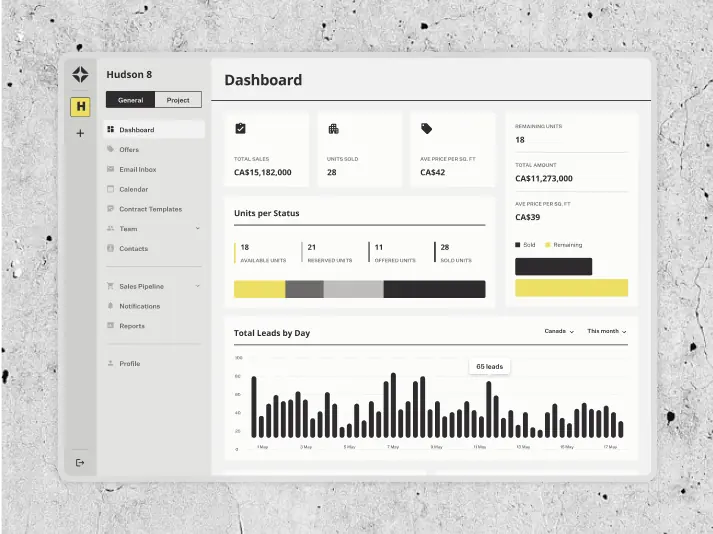
AIRES AI-powered CRM for real estate
AIRES HIGH-END CRM SYSTEM DESIGNCanada
Results

Enhanced sales efficiency

Unified platform for all users

Reduced development costs

#UX Audit #Product redesign #Web development #Team extention
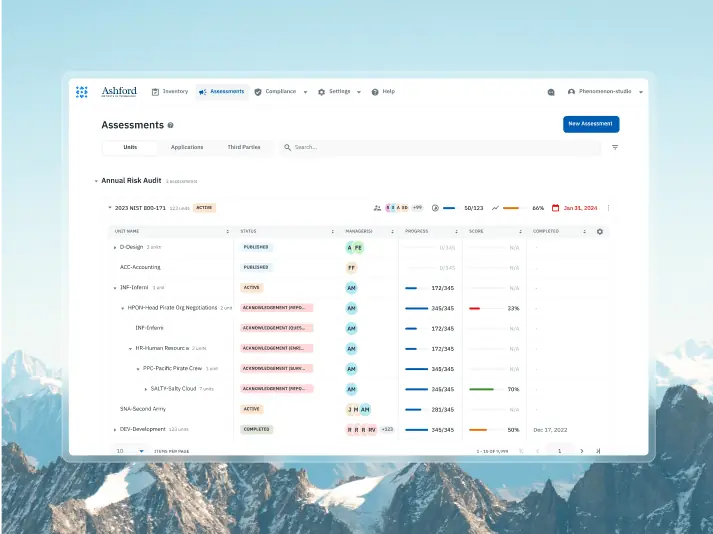
Isora optimizing governance, risk & compliance for top institutions
SaltyCloud HIGH-END CRM SYSTEM DESIGNTexas, USA
Tech Stack

React, Python, AWS

Timeline

12 months, ongoing

Results

2x faster user workflows

50% shorter time-to-market

Nominated for UX Design Award 2024

#Product redesign
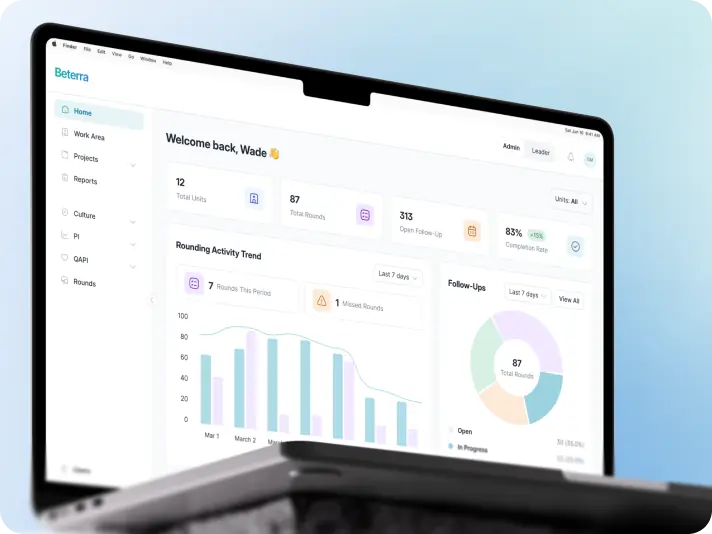
Beterra hospital operations platform streamlined issue tracking across multi-level healthcare teams
BETERRA HIGH-END CRM SYSTEM DESIGNUSA
Results

Mobile-first workflows

Improved user experience

More focused product direction

what our clients say
5.0 is our average
on clutch & designrush
HIGH-END CRM SYSTEM DESIGN

Craig Tortolani

CPO at Dekryption Labs

HIGH-END CRM SYSTEM DESIGN

Ash Bryant

Founder of Hormn

The design team is truly world-class, excelling in both user interface design and creating solutions optimized for conversion.

HIGH-END CRM SYSTEM DESIGN

KlickEx Team

HIGH-END CRM SYSTEM DESIGN

George Fry

Founder at Neap

The quality of the designs is fantastic. Phenomenon Studio works at speed and is extremely punctual with timelines. They deliver top-notch outcomes with exceptional designs.

HIGH-END CRM SYSTEM DESIGN

Andre Guerra

Co-Owner at RADCAT Design

HIGH-END CRM SYSTEM DESIGN

Kevin Alvarez

Founder & General Partner, Predictive

Phenomenon Studio's ability to translate concepts and rough design mock-ups into high-fidelity assets, designs, and visuals was very impressive. The goal was to maintain simple elegance in the design aesthetic, and they did it very well.

CUSTOM СRM DEVELOPMENT COST: FACTORS TO CONSIDER

What affects the cost, speed, and scope of building or redesigning a custom CRM system
Before you

hire CRM developers

, it’s important to understand what you’re building and what it will take. Whether you’re creating an internal tool or planning to sell your CRM as a SaaS product, the features you choose will define your timeline, scope, and budget. Here’s what often drives up the cost of CRM system development services.
What drives your software CRM development costs up?
01
Multi-role logic
Adding distinct workflows for sales, ops, support, and admin increases system complexity.
02
Custom dashboards
Tailored UI tied to real-time metrics requires additional CRM dashboard design and backend development.
03
AI/ML features
Smart scoring, task automation, or insights require additional dev and data setup.
04
Third-party integrations
Syncing with tools like email, payments, or calendars expands the scope of your CRM design & development.
05
Mobile-optimized UI
Creating responsive CRM UI designs for all devices extends design and QA hours.
06
Legacy system migration
Cleaning and importing existing data often slows development and adds risk.
07
Migration from legacy tools
Cleaning, importing, and adapting old CRM data often uncovers hidden dependencies.

HIGH-END CRM SYSTEM DESIGN

Get a tailored estimate for your CRM

Not sure how big your CRM project really is? Let’s walk through your internal workflows, platform goals, and technical requirements together. We’ll map out your estimated costs, project scope, and timeline before you commit to a full CRM system development services engagement.

HOW TO WORK WITH US

Explore collaboration models tailored to your CRM dashboard design and development needs
Partner with a full-cycle product design company
We work as your long-term product design and development partner, owning strategy, discovery, design, dev, QA, and scaling iterations. This is not a “project”— it’s your full product team.
Best for
  • Founders who want a senior team thinking beyond sprints
  • Startups scaling beyond MVP and needing deep product ownership
What you get
  • Expert team aligned with your roadmap, KPIs, and business goals
  • Strategic discovery, UX systems
Hire a full-stack dedicated team
We deliver your product from idea to launch—fast and lean. You get execution-ready design and development support with a clear project scope and delivery timeline.
Best for
  • MVPs or feature builds with a defined goal and launch window
  • Pre-seed and seed startups that need to ship without building an in-house team
What you get
  • UI/UX, development, QA, and PM in one dedicated team
  • Clear scope, fixed timeline, efficient delivery
Augment your existing team
We provide developers, designers, and QA engineers to integrate with your team, helping you scale fast while keeping full control over execution.
Best for
  • Startups needing specialized expertise without long-term hiring
  • Seed & Series A+ startups looking to accelerate development
What you get
  • Embedded designers, developers, or product managers to fill skill gaps
  • Faster product delivery without the hiring delays & overhead costs

WHY CHOOSE US AMONG OTHER CRM DEVELOPERS?

Your success is our priority
Design that meets regulation
HIPAA- and GDPR-certified expertise for Healthcare and beyond.

Since 2019, we’ve gained HIPAA and GDPR certifications and industry recognition, delivering hundreds of products in Healthcare, SaaS, FinTech, and EdTech — where compliance and UX go hand in hand.

Design that lasts beyond trends
We don’t chase fads. We build digital products that stay relevant.

Our work looks sharp today and stays usable tomorrow — designed around long-term value, not short-term gimmicks. Scalable systems, brand consistency, and smart UX that grows with your product.

Design that’s developer-ready
We design for implementation, not handoff.

Every component is built with devs in mind: design tokens, accessibility, reusability, and real-world constraints. We collaborate with your team, reuse existing elements, and stay involved until everything’s live.

Local presence. Global delivery
Work directly with the doers — not a chain of account managers.

Collaborate with UX strategists in North America, while our senior design and development teams in Europe deliver fast, consistent results. We integrate into your tools and workflow, working as part of your team — from a single embedded designer to a full product squad.

AWARD-WINNING PRODUCT DESIGN, RECOGNIZED WORLDWIDE

Wins that inspire us forward
HIGH-END CRM SYSTEM DESIGN

Top product design company 2024

HIGH-END CRM SYSTEM DESIGN

One of Dribbble’s top rated design agencies

HIGH-END CRM SYSTEM DESIGN

Red Dot Award winner in app design category

HIGH-END CRM SYSTEM DESIGN

Nominations for several projects across different categories

HIGH-END CRM SYSTEM DESIGN

Site of the Day & honorable mentions

32+
others

Related Services

Services that pair well with your CRM app development project needs
Branding

Develop a brand that resonates — visually, emotionally, and strategically.

Custom MVP development

Expand your prototype into a fully functional, production-ready product.

UX audit

Identify usability bottlenecks, improve engagement, and optimize for conversions.

FREQUENTLY ASKED QUESTIONS

Questions already
answered
01
How to design a CRM that teams actually use daily?

How to design a CRM that gets used regularly starts with asking the right questions before any line of code is written. What actions do users repeat? Where do tasks fall through the cracks? What frustrates your team today?

Strong CRM design is less about piling on features and more about mapping workflows. From lead management to deal tracking, the system should reflect real-life behaviors. Think role-based dashboards, smart automation, and clear UI patterns – all tailored to reduce clicks, confusion, and friction.

Collaborate with experienced CRM developers early to validate your structure, run usability tests, and refine your interface logic. That’s how teams stay engaged after launch; not because they’re told to use the CRM, but because they want to.

To move from idea to adoption, many companies work with bespoke CRM developers who specialize in building systems tailored to specific operational styles and team structures. These experts help translate your day-to-day workflows into a system your team wants to use and stick with.

If you’re part of a business services CRM environment where multiple clients, tasks, or vendors are being tracked, ensuring the system is intuitive and role-specific from day one is even more important. A custom CRM tailored to this kind of dynamic structure significantly reduces miscommunication and improves service delivery across departments.

02
What should I plan before designing a custom CRM system?

When companies ask how to design a CRM system, they’re usually sitting on top of disconnected tools, patchy workflows, and mounting complexity. Before you build anything, you need to step back and plan what your CRM will need to handle.

Start with:

  • User roles and access levels
  • Cross-department workflows
  • Key performance metrics
  • Third-party tool dependencies (email, calendars, ticketing)

If you’re launching a SaaS platform, long-term scalability and modular design matter even more. Bringing in a CRM development services provider at the discovery stage helps map everything out – from permissions and dashboards to mobile support and backend logic – so you’re not reworking things later.

It’s also essential to align your goals with the right technical foundation. Collaborating with a partner skilled in CRM development will ensure your architecture is built to support multiple roles, integrations, and future iterations. These specialists focus not just on aesthetics, but on scalable systems that hold up under the weight of real-world workflows.

Finally, if you plan to scale rapidly or pivot your internal tool into a SaaS product, it’s smart to involve a custom CRM software development services team that can adapt your system from early prototype to a multi-tenant platform with proper role logic, data isolation, and compliance features.

03
How do I control who sees what in a CRM?

Access logic is a core part of system planning, and that’s where CRM designation comes into play. It defines what data users can view, edit, or act upon depending on their role.

Strong CRM designation helps prevent:

  • Data leaks or accidental access
  • Workflow breakdowns from misaligned roles
  • Bottlenecks caused by manual approvals or poor visibility

A well-structured access model reduces training time and improves data hygiene. Instead of hard-coding permissions, use templates tied to role hierarchies and align them with the overall CRM UX design so admin control doesn’t require a developer every time something changes.

While many companies focus on dashboards and pipelines, your system’s long-term success hinges on setting smart visibility and control logic from the beginning. That’s where working with a CRM developer can offer guidance based on proven system architecture and scalable design logic.

Especially for hybrid platforms where CRM and customer support teams share the same environment, access logic becomes crucial. Role-based controls ensure service reps can access ticket history and messaging tools without interfering with sales pipelines or analytics. When set up well, this access structure helps avoid duplicate work and improves issue resolution speed across departments.

04
What should I ask before hiring someone to build my CRM?

Before you hire CRM developers, define the problem your CRM needs to solve. Are there disjointed workflows? Lack of reporting? Missed follow-ups? Having clarity on your internal logic will save time, money, and rework later.

Then assess if your vendor:

  • Offers bespoke CRM development (vs. template customization)
  • Provides full-cycle services (discovery, design, development, QA)
  • Can support scaling or SaaS-level features later

Choosing the right CRM application development services means getting a partner, not just a provider. They should help shape your thinking, challenge assumptions, and guide you through architecture, security, integrations, and long-term use.

In many cases, it’s not just about who you hire but how early you bring them into the process. If you plan to scale, monetize, or customize deeply, make sure to hire CRM software developer teams that not only build, but also test, iterate, and scale full CRM platforms across industries.

Whether your CRM is aimed at streamlining internal ops or powering client-facing portals, hiring someone with both domain and technical fluency is non-negotiable. A seasoned CRM developer will align technical execution with business logic, helping you avoid costly reworks or user drop-off down the line.

05
What do I need to consider for a healthcare CRM build?

Let’s break it down: healthcare CRM development often involves strict compliance, multi-role systems, and sensitive data management. Unlike sales CRMs, healthcare platforms require careful planning around patient confidentiality, care coordination, and third-party integrations.

You’ll need to think through:

  • HIPAA or local compliance requirements
  • Role-specific dashboards for practitioners, support, admin
  • Integration with EMRs or appointment scheduling tools

Because of the legal and technical complexity, healthcare systems demand a more rigorous QA and security process. Partnering with a CRM development services team that has prior healthcare experience makes a big difference in timelines and system quality.

In healthcare-specific use cases, the CRM often overlaps with clinical and operational systems, creating more demand for secure data layers, robust permission logic, and integration with lab reports or e-prescription tools. If you’re looking to hire CRM software developer teams for this type of work, be sure they’ve delivered platforms in regulated industries before.

What sets successful healthcare CRM development apart is not only compliance but also usability. Doctors and care coordinators won’t tolerate clunky, multi-click flows. Clear dashboards, mobile access, and synced patient timelines are critical for engagement and effectiveness.

06
What’s different about CRM for real estate agents?

In real estate CRM software development, you’re managing far more than just client data; you’re also tracking listings, offers, timelines, documents, and communication across multiple parties.

Expect to build features like:

  • Visual deal tracking stages (listings, offers, closings)
  • Integration with MLS or property listing platforms
  • Secure document storage with version control

Some systems also embed broker-agent-client portals with task automation and lead scoring. A strong CRM application development company will help you translate your brokerage workflows into intuitive tools without overwhelming users.

When designing CRMs for real estate, you also need to account for offline usage (e.g., field viewings), granular permission tiers for assistants and agents, and document signing flows for legal agreements. This makes custom CRM software development services critical to success, especially for firms looking to go beyond plug-and-play platforms.

Don’t underestimate the branding layer either. For many brokerages, the CRM becomes a customer-facing portal, so user interface design and trust-building UI elements should be part of your product roadmap. If you plan to evolve the platform into a SaaS solution for agencies, partnering with top-notch CRM developers early on helps lay the right architectural foundation for scale.

07
Do I need to build from scratch or customize Salesforce or HubSpot?

There’s no one-size-fits-all answer. It’s worth mentioning that Salesforce CRM development services are great for companies with standard workflows and big teams. However, they come with high costs, rigid logic, and limited customization unless you invest heavily in admin support and engineering time.

Instead of relying on Salesforce CRM development services, you might want to build custom when:

  • Your workflows don’t fit traditional sales pipelines
  • Licensing or user-based costs add up quickly
  • You need tight control over permissions and data flows

In these cases, working with bespoke CRM developers gives you the flexibility to build exactly what you need and own it fully. Unlike off-the-shelf tools, a custom CRM can mirror your internal structure, evolve with your operations, and allow complete UX control from day one.

Still, customization of a platform like Salesforce might make sense if your team is already embedded in its ecosystem. In those cases, it’s worth consulting a CRM development company to assess what’s faster: deep customization or full platform build. Either path should start with system architecture, team flows, and user-specific goals before touching any code.

08
What’s the typical cost range to build a CRM?

Costs vary depending on scope, features, and delivery speed. Factors that increase cost:

  • Custom dashboards and AI features
  • Multi-role workflows and logic
  • Data migration and legacy tool cleanup
  • Mobile optimization and QA
  • API or ERP sync needs

For accurate estimates, your CRM application developer should first run a discovery phase to document user roles, feature needs, and logic. That’s what defines the timeline, complexity, and total build cost.

You’ll also want to consider how your system might evolve. If you plan to offer it externally or add ERP integrations, it’s worth discussing that during the planning phase. Teams offering web development CRM services often help bridge the gap between internal tooling and public-facing platforms, especially if you’ll need onboarding portals, account dashboards, or client reporting views layered on top.

09
Can I build a CRM and then sell it as a SaaS product?

Yes, and many companies take this route. But turning your internal tool into a commercial product requires more than just rebranding.

A productized CRM needs:

  • Multi-tenant hosting and permissions
  • Admin dashboards and support tools
  • Billing, onboarding, and user management
  • Usage tracking, feature toggles, and analytics

Working with a top-notch CRM development services provider ensures you’re not just building an MVP; you’re laying the foundation for a scalable product. The more flexibility you need (e.g., for different verticals or client roles), the more modular your backend and frontend must be.

In these projects, some CRM and customer service logic becomes productized as well, allowing end clients to offer service desks or comms tools inside your platform. This expands your value proposition but also increases complexity, so be sure your tech partner is ready for both the build and long-term evolution.

10
What’s the difference between CRM and ERP development, and when do they overlap?

While CRMs focus on leads, communication, and service pipelines, ERP systems manage inventory, finances, logistics, and internal operations. That said, ERP and CRM development can overlap when a company needs to manage the full lifecycle, from lead to invoice.

You might blend:

  • CRM: Sales, support, campaign tracking
  • ERP: Inventory, procurement, HR, accounting

If you’re building a unified system, this affects architecture from the beginning. Define where data is created, who owns it, and how it flows across modules. Your CRM system development services partner should be able to guide data mapping, API strategy, and access logic across departments.

For example, a retail company might build a CRM that includes sales lead tracking, order management, and supplier workflows – all under one roof. In such cases, you’ll need specialists in both sides of the equation: sales/user workflows and operational back-office architecture.

It’s also where hybrid roles like web development CRM partners come into play, helping you merge backend system logic with clear, usable interfaces.

Contact us

Have a project in mind?
Let's chat

Your Name

Enter your name *

Your Email

Enter your email *

Message

Tell us about your project

You can upload maximum 5 files
Some of your file not loaded, because maximum file size - 5 mb
Your budget for this project?

By clicking this button you accept Terms of Service and
Privacy Policy

HIGH-END CRM SYSTEM DESIGN
Thanks for taking time to reachout!
Stay connected with us by subscribing to our LinkedIn account. By following, you’l be the first to hear about our latest updates, news, and exciting development. We look forward to sharing our journey with you!
HIGH-END CRM SYSTEM DESIGN
Thanks for taking time to reachout!
We’d love to hear more about your project! Feel free to schedule a call using the link provided. This will help us better understand your vision and ensure we’re aligned on all the details.
Have a project to
discuss?
HIGH-END CRM SYSTEM DESIGN
Kseniia Shalia
Account Executive
Have a partnership in
mind?
HIGH-END CRM SYSTEM DESIGN
Polina Chebanova
Co-Founder & CPO