



Aug 13, 2026
6 min read
summary
See how three specialized AI agents turn requirements into backend logic and pixel-accurate frontend code, cutting development time by up to 4x.
Inside our AI agent pipeline: how BA, backend, and frontend agents build a product
Our AI pipeline runs three specialized agents that hand structured artifacts to each other along the software development lifecycle, so requirements, backend logic, and frontend code stay consistent from the first day of a project.
Core facts
- We run three role-specific agents rather than one generic assistant, each with its own rules and constraints.
- The backend agent generates roughly 60 to 80% of default CRUD and boilerplate logic from a structured specification.
- The frontend agent builds against a real API contract and reads Figma through MCP for pixel-accurate UI.
- The multiplier comes from the structure around the models. The agents match the conventions and review gates we encode.
Most agencies that mention AI stop at one sentence. We use Claude. That tells a client nothing about whether the code can be trusted in production. This piece walks through how the pipeline is built, and why the structure around the model matters more than the model.
By Anatoliy Sakhno | Head of Development, August 2026
An ecosystem of agents, not autocomplete
Most teams use AI in an ad hoc way. They paste snippets into a chat window and copy the output back. We built an engineering workflow around AI from the ground up instead.
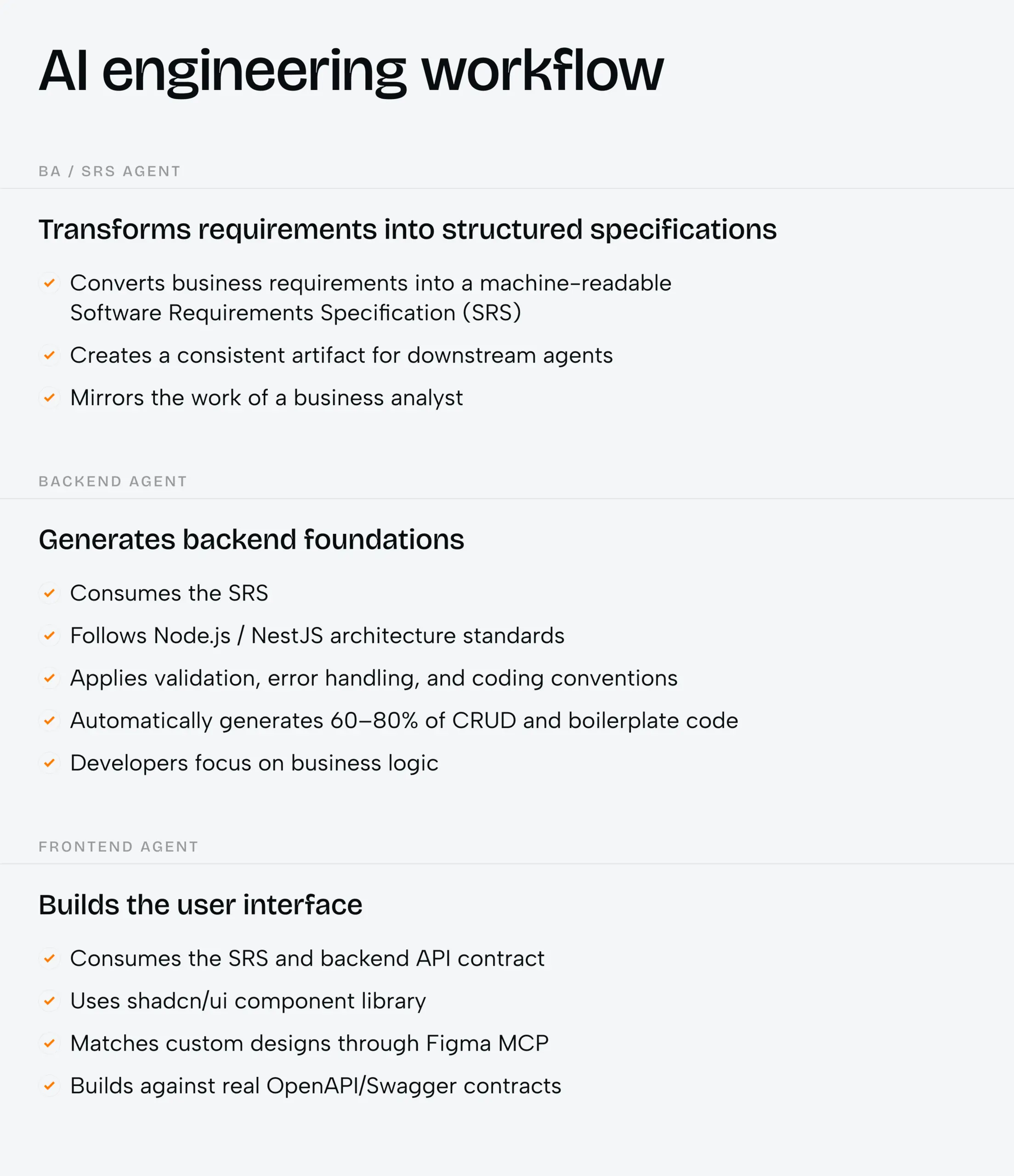
Rather than treating AI as autocomplete inside individual editors, we run an ecosystem of specialized agents. Each one is configured with its own rules and patterns and constraints. They hand work off to each other along the path a feature travels through our software development lifecycle.
The foundation is a single agentic system, Claude, configured into role-specialised agents. Each agent operates inside a well-defined set of standards. Its output stays consistent with how we actually build, from day one.
The first agent in that ecosystem never writes product code. It writes the specification everything else depends on.
It starts with a spec the agents can read
The BA and SRS agent sits at the front of the pipeline. It takes the requirements and produces a structured Software Requirements Specification. That is the same artifact a business analyst would write. Here it takes a consistent, machine-readable shape the downstream agents can consume directly.
During the business analysis and solution architecture phases, this agent structures requirements into clear technical documentation. It generates implementation plans aligned with our internal patterns. It also validates technical decisions against our existing codebase.
The documentation is written to be transparent for you and structured for the agents at the same time. The quality of everything downstream tracks the quality of this specification. The backend agent is the first to put it to work.
The backend agent handles the boilerplate
The backend agent works in JavaScript on Node.js with NestJS, our primary backend stack. It is configured with our backend conventions. That means our architecture patterns and validation and error handling, the constraints we enforce in review.
It consumes the SRS from the BA agent and generates roughly 60 to 80% of the default CRUD and boilerplate logic automatically. That leaves the team to focus on the domain-specific parts that need real judgment.
The agent reasons at the system level. It considers architecture and dependencies and the full codebase context, not just one file. It also produces the API contract the frontend builds against, which is the next input in the chain.
From Figma to accurate front-end code
The frontend agent works from our shadcn/ui component library. Where a design has to be matched precisely, it pulls custom UI through the Figma MCP. It reads two inputs: the SRS from the BA agent and the OpenAPI or Swagger contract from the backend agent. So the frontend is built against a real contract, not assumptions.
What MCP is, without the jargon
MCP stands for Model Context Protocol. It is an integration layer that lets our agent connect directly to Figma and read it as structured data rather than a static image. The agent reads the file itself, instead of a developer guessing at spacing values.
What the agent reads from Figma
When the agent connects to a Figma file, it does not see a picture. It reads the actual layout grid and the exact spacing values. It reads component names and typography styles as precise numbers, along with the design system tokens. That gives it a level of design fidelity that is hard to reach by hand.
What the agent generates
From that structured data the agent produces React components built to match the Figma frame. It reuses components from our shadcn/ui library where they exist and creates new ones where they do not. A senior frontend engineer reviews every generated component before it enters the codebase.
The MCP integration is read-only. Our agent reads design structure from Figma and never writes back to it, modifies it, or exposes it externally. Source: Phenomenon Studio engineering policy
Where design ends and engineering takes over
Accurate components are only part of a working screen. Figma captures how a screen looks, not how it behaves. Some areas need explicit engineering input, where our engineers take the lead.
Interactive behaviour needs engineering. Hover states and click logic and transitions between states require explicit prompting. Animations need hand-crafted logic. Figma defines the intent, not the smooth motion.
Conditional rendering lives outside the design file. Screens that change with user role or data state need business logic the frame does not hold. Data binding is an engineering concern too, since real API responses and loading states sit with engineers.
Accessibility needs dedicated attention. The agent can apply basic ARIA attributes and semantic HTML. Keyboard navigation and screen-reader behaviour still require engineering care. These are the boundary between what design defines and what engineering builds, and we plan for all of them up front.
Design quality decides output quality
The accuracy of generated code tracks the quality of the design it reads. A well-structured Figma file converts into clean code almost automatically. A disorganised file with layers named “Rectangle 47” produces ambiguous output that costs engineering time to clean up. This is why our designers build Figma files structured for AI-assisted development.
That input-quality rule holds across the whole pipeline, because each agent feeds the next.
Why the contracts hold it together
Each agent is scoped and contract-driven, and hands a well-defined artifact to the next, so the orchestration holds together instead of drifting. Each agent produces an output the next one can read.
In practice this gets us to a working product about two times faster on a typical build. On simpler products with heavy CRUD or custom business logic, it reaches about four times.
On a typical build the pipeline reaches a working product about 2x faster. On CRUD-heavy or custom-logic products, about 4x. Source: Phenomenon Studio delivery data
Worth saying plainly. The multiplier comes from the structure around the models, not the models alone. Scoped agents pass real contracts to each other, and enforced review gates keep the pipeline from drifting.
On top of this foundation, engineers use AI-powered IDEs such as Cursor as an in-editor pair programmer. The IDE is a convenience layer over the same agentic approach, and the encoded standards remain the source of truth. That same discipline governs what data the agents are allowed to see.
How we protect your data and your IP
Every project runs on a modern stack our agent is deeply trained on, which means less setup time and fewer errors from day one. The table below shows the default layers.
| Layer | Tools |
| Frontend | React, shadcn/ui, Next.js, TypeScript |
| Backend | NestJS, TypeScript, PostgreSQL or MongoDB, REST or GraphQL, Redis |
| Infrastructure | Docker, CI/CD pipelines, AWS or GCP or Vercel |
| AI tooling | Claude for planning and review, Cursor for in-editor generation |
AI tools bring real speed, and they must be operated responsibly. As a matter of policy we do not share PII or PHI or secrets with AI tools. Agents operate on sanitised or abstracted code context. AI works on code structure and logic, not on live production data.
Healthcare, EU data, and compliance
For healthcare clients we do not expose PHI to AI tools at any stage. Code that handles PHI is abstracted before it reaches an agent. For EU clients, personal data stays out of AI prompts and context.
Where a project needs a Business Associate Agreement, standard consumer AI tools cannot sign one. For those cases we either use enterprise-tier providers with BAA capability or restrict AI to non-PHI code paths. For SOC 2 clients, we disclose our AI tooling stack and its data handling.
“We do not simply use AI tools. We built AI into the engineering process itself. Every project type and every quality gate is designed around controlled, engineer-validated output.”
Compare notes on your setup
Most AI-in-development pitches stop at the sentence “we use Claude.” The value sits in the orchestration around it. If you have built your own knowledge layers or CI/CD around AI, a working call should be useful on both sides.
Share this article with friends



Sep 29, 2026
6 min read
B2B website redesign without losing traffic: A complete b2b website redesign guide covering UX audits, 301 redirect mapping, and metadata preservation. Partner with a top b2b website redesign agency that boosts conversions while protecting your organic rankings.

Sep 29, 2026
8 min read
Small business web design services that fit your budget. Get affordable small business website design from one of the best website design companies for small business — with transparent pricing and no hidden fees.
